Page 1 of 1

Custom Foliage Issues [Solved]

Posted: Sat May 02, 2009 1:33 pm
by Superm9
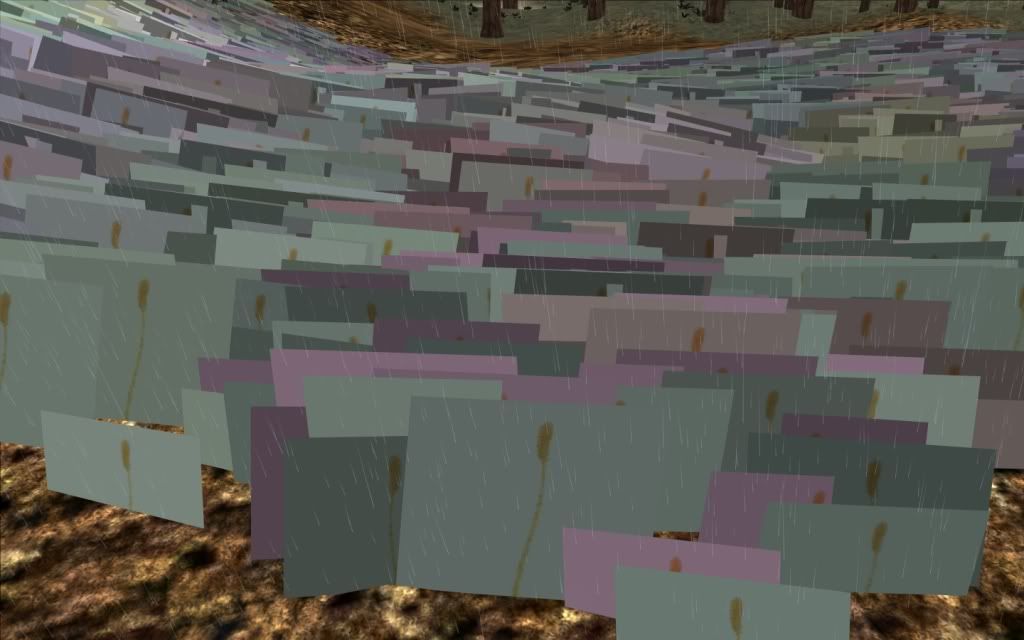
I am having some issues with creating custom foliage. I am trying to create a wheat-like foliage (called barq); but when I put it ingame it looks like a really bad field of multicolored squares, with the wheat texture (which I believe was created by ryukaji for Caleb1117) sitting in the middle of the square; here's what I mean:
Hidden/Spoiler:
Image
Yeah...

Here is the wheat's .odf file:
Hidden/Spoiler:
[GameObjectClass]

ClassLabel = "grasspatch"
GeometryName = "editor_grasspatch.msh"


[Properties]

MinSize = "2.5"
MaxSize = "3.5"
Alpha = "1.0"
NumParticles = "40"
MaxDistance = "40"
Texture = "qla_barq1"
NumParts = "1"
RadiusFadeMin = "4.0"
RadiusFadeMax = "5.0"

DarknessMin = "0.5"
DarknessMax = "1.0"
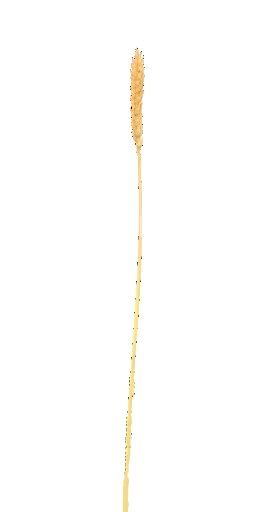
The image for the wheat (I saved it as a 256 by 512 image - are those ok dimensions, seeing as they aren't the same power of 2?)
Hidden/Spoiler:
Image
My .prp file (the significant bit):
Hidden/Spoiler:
Layer(3)
{
SpreadFactor(0.1);
Mesh()
{
GrassPatch("qla_barq1.odf", 40);
File("editor_grasspatch.msh", 80);
Frequency(100);
Scale(1);
Stiffness(0.0);
CollisionSound("foliage_collision");
ColorVariation(0.2);
AIVisibilityFactor(0.40,0.9);
}
}
Can anyone give me a basic pointer on how to create custom foliage (or if anyone has a wheat-like foliage ready-made, I'll take that too :wink: )?

Thanks!

Re: Custom Foliage Issues

Posted: Sat May 02, 2009 1:54 pm
by bobfinkl
Just make the white on the wheat texture transparent and remove this line from the .prp file.

ColorVariation(0.2);

Re: Custom Foliage Issues

Posted: Sat May 02, 2009 1:56 pm
by YaNkFaN
you need an alpha channel on the texture

Re: Custom Foliage Issues

Posted: Sat May 02, 2009 3:06 pm
by Superm9
I just realized that when I saved the barq (wheat) texture, I saved it as a 24-bit, and not a 32-bit, picture - 24-bit doesn't save the empty space, it fills it in with white. When I did this, the wheat/barq texture showed up just fine ingame.

Thanks! :thumbs: