
Skinning Humans
Moderator: Moderators
-
Daniel0605
- Private Third Class
- Posts: 47
- Joined: Wed Nov 14, 2007 11:42 am
- Projects :: No Mod project currently.
- xbox live or psn: No gamertag set
- Location: Dominica
- Contact:

Skinning Humans
I want to replace the Obi-Wan head with another human head. Can I transfer the head from a picture into the skin? How do I make the head of the skin? Also just in general, how do you skin humans?
-
The_Emperor
- Supreme Galactic Ruler
- Posts: 2118
- Joined: Sat Dec 10, 2005 6:30 am
- Projects :: No Mod project currently.
- xbox live or psn: No gamertag set
- Location: Waaaaay over there.
Re: Skinning Humans
Like you'd reskin anything else. Just paste a different face over the original face. Make sure the eyes are at the same spot as the original texture's eyes, same goes for mouth and nose. Note that many human skins mirror the face, so watch out with weird shadows and stuff.
-
SilvaDalek
- Sith

- Posts: 1329
- Joined: Sun Dec 02, 2007 12:52 pm
- xbox live or psn: TH3 R0LL3R
Re: Skinning Humans
so just you'd just pop the picture over it?
-
Snork

- Lieutenant General

- Posts: 669
- Joined: Thu Jun 07, 2007 3:34 pm
- xbox live or psn: No gamertag set
- Contact:
Re: Skinning Humans
yes.
What I find works best (using Paint Shop Pro X) is that I put the skin as a second layer, and put the skin with the face i want in the background layer under the original skin. I align the faces so they are in the right spots, and then I erase the face from the original skin on the one layer, so the other layer shows up. If there are any blank spots, I use the smudge tool to spread the face out and make it look better. A good example of this is here:
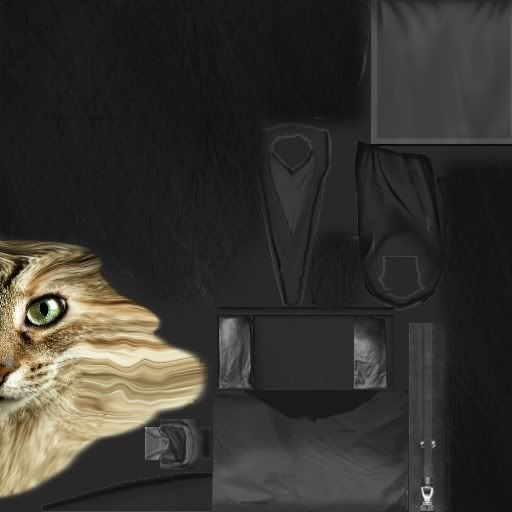
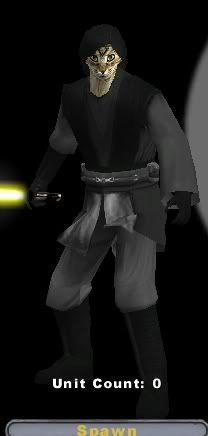
What I find works best (using Paint Shop Pro X) is that I put the skin as a second layer, and put the skin with the face i want in the background layer under the original skin. I align the faces so they are in the right spots, and then I erase the face from the original skin on the one layer, so the other layer shows up. If there are any blank spots, I use the smudge tool to spread the face out and make it look better. A good example of this is here:
