Page 1 of 2
New unit not visible in SWBF Viewer
Posted: Sun Mar 10, 2013 4:05 pm
by AhsokaTano
Hello.
Finally I decided to start learning with XSI and making a new unit.
I followed this tutorial:
https://sites.google.com/site/swbf2modt ... tup-in-xsi
I exported my unit using the XSI ZETools. And all was going well, but when I put the mesh in the SWBF Viewer it is invisible, I can't see it.
I don't know how to fix it.
I made the model in 3ds Max, I put the texture in 3ds Max, I exported the model as .obj and then I imported it in XSI.
One thing I can't make is put the yellow H in override_texture because I don't know how can I make this.
This is the first time I use XSI.
How can I solve it?
Thanks.
Re: New unit not visible in SWBF Viewer
Posted: Sun Mar 10, 2013 4:07 pm
by Marth8880
Is the model enveloped to a skeleton? Is it weighted? Make sure you follow all of the steps.
Re: New unit not visible in SWBF Viewer
Posted: Sun Mar 10, 2013 5:01 pm
by AhsokaTano
I had a lot of questions when I was following the tutorial.
Inside REP_CloneTrooper_Mesh I have to put the mesh, but it is my mesh right? And, have I to put inside it the override_texture?
Inside REP_CloneTrooper_Shadowvolume, what exactly I have to put inside? I read this: SV=Shadow volume layer; but I don't understand. Is it GroundDummy.sv_jettrooper?
Ah, and the words are in different colors and without the H in my XSI. I use Softimage XSI 2013.
Re: New unit not visible in SWBF Viewer
Posted: Mon Mar 11, 2013 8:05 am
by AceMastermind
Don't worry about layers, they are optional and will just confuse most beginners. The Character Tools tab in ZE Tools can grab all the deformers you need for the envelope anyway. To hide something just make a selection and press the H key on your keyboard. I can't see your image.
Re: New unit not visible in SWBF Viewer
Posted: Mon Mar 11, 2013 10:32 am
by Nedarb7
Is your model textured in XSI? (go into texture decal view)
The letters should be colored
Re: New unit not visible in SWBF Viewer
Posted: Mon Mar 11, 2013 1:56 pm
by AhsokaTano
Well, in my layers I have this:
I can't see the texture in my model, but I texured it in 3ds Max. Have I to textured again in XSI?
Ah, other thing, I export it well, without errors, and the .msh is about 67 kb. But I put it in the SWBF Viewer and I can't see the model.
Re: New unit not visible in SWBF Viewer
Posted: Mon Mar 11, 2013 2:31 pm
by Nedarb7
Re: New unit not visible in SWBF Viewer
Posted: Mon Mar 11, 2013 2:51 pm
by AhsokaTano
Well... Now I can see the texture in XSI, but the model doesn't show in the Viewer.
When I export the model I have this:
I don't know what it want to say with hp_weapons missing primitive type name. And It have two materials, can be this the problem?
Re: New unit not visible in SWBF Viewer
Posted: Mon Mar 11, 2013 3:03 pm
by Nedarb7
AhsokaTano wrote:hp_weapons missing primitive type name
It always says that when you make a player model.
Make sure the "Mesh" layer is checked visible (note: the red circle is not what I'm pointing out):

Re: New unit not visible in SWBF Viewer
Posted: Mon Mar 11, 2013 3:05 pm
by AhsokaTano
Yes, it is visible. In this layer I have the GroundDummy (no yellow), Camera_Interest (yellow), GroundDummy.override_texture (yellow) and GroundDummy.default1 (no yellow).
Other thing, I don't have a list and then inside the list all layers.
Re: New unit not visible in SWBF Viewer
Posted: Mon Mar 11, 2013 3:11 pm
by Nedarb7
AhsokaTano wrote:Other thing, I don't have a list and then inside the list all layers.
Ummm.... What do you mean?
I take it what you mean by yellow is a yellow H correct?
Another thing, make sure "DummyRoot" is parent of your player model.
Re: New unit not visible in SWBF Viewer
Posted: Mon Mar 11, 2013 3:18 pm
by AhsokaTano
In the image he have the layers inside the "list".
Yes, I want to say yellow H.
How can I know that? When I clic in the center button of my mouse in DummyRoot, it selects the DummyRoot, override_texture, default1 (my mesh) and sv_jettrooper. And then I go to layers and I can see that is selected all except GroundDummy, Camera_Interest, Camera_Root, Camera, Light and GroundDummy.GroundDummy.
Can be the problem the yellow H?
Re: New unit not visible in SWBF Viewer
Posted: Mon Mar 11, 2013 3:20 pm
by Nedarb7
Click on "scene" and this window will pop up:
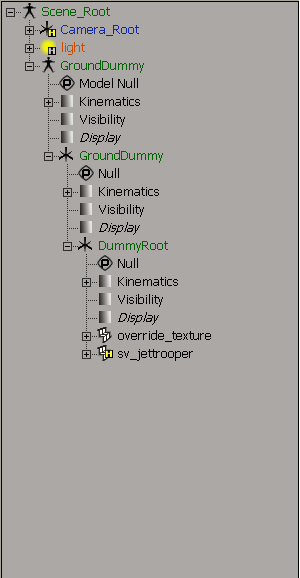
Your model needs to be under dummyroot
Re: New unit not visible in SWBF Viewer
Posted: Mon Mar 11, 2013 3:42 pm
by AhsokaTano
I have it under the DummyRoot.
I see one thing, in your screenshot and in the tutorial, you have next to override_texture a white form, I have a black arrows, like the DummyRoot have.
Re: New unit not visible in SWBF Viewer
Posted: Mon Mar 11, 2013 4:21 pm
by ANDEWEGET
That means there's no mesh. Can you see your model in the viewport?
Re: New unit not visible in SWBF Viewer
Posted: Tue Mar 12, 2013 1:05 pm
by AhsokaTano
Yes, I can. I see my model and the texture of my model.
Re: New unit not visible in SWBF Viewer
Posted: Tue Mar 12, 2013 1:11 pm
by ANDEWEGET
Then click your model in the viewport to select it. Then open the XSI Explorer (8 key), find the highlighted model and drag&drop it onto DummyRoot. Make sure you're in Scene 'mode' by pressing S when you're in the explorer.
Re: New unit not visible in SWBF Viewer
Posted: Tue Mar 12, 2013 1:26 pm
by AhsokaTano
It is already in DummyRoot and it doesn't work

Re: New unit not visible in SWBF Viewer
Posted: Tue Mar 12, 2013 2:50 pm
by sereja2
You may just import any stock unit, from assets, and explore, how it should set up.
Re: New unit not visible in SWBF Viewer
Posted: Tue Mar 12, 2013 3:08 pm
by AhsokaTano
All I imported was the model of the tutorial and my model in .obj.
I made again the process of the tutorial, but nothing. There is something I made wrong... But I don't know what. I follow all the tutorial.
I know you said it, Ace, but can be the layers? Anything I have to hide? I'm very confused...


