Okay, I installed it, and the file appears in the toolbar, however, none of it works... When I looked at the log, It read:
Hidden/Spoiler:
# INFO : registering XSIZETools
# INFO : plugin version: 0.9.07.02
# INFO : plugin path: F:\Autodesk\Softimage 2012\Addons\XSIZETools\Application\Plugins\
# INFO : registered ZETools commands
# INFO : getting bone list
# INFO : no bones found
# ERROR : Traceback (most recent call last):
# File "<Script Block 2>", line 87, in XSIZETools_Execute
# templateFile = open(str(addonpath + "\\XSIZETools\\Resources\\Templates\\templates.tcnt"), "r")
# IOError: [Errno 2] No such file or directory: 'C:\\users\\User\\Autodesk\\Softimage_2012\\Addons\\XSIZETools\\Resources\\Templates\\templates.tcnt'
# - [line 86 in F:\Autodesk\Softimage 2012\Addons\XSIZETools\Application\Plugins\XSIZETools.py]
# ERROR : OLE error 0x80020101
Application.XSIZETools()
Application.ClothCreate()
# ERROR : 2000 - File not found - C:\users\User\Autodesk\Softimage_2012\Addons\XSIZETools\Resources\Logic\ClothLogic.py
# ERROR : Traceback (most recent call last):
# File "<Script Block 2>", line 456, in MSHExport_Execute
# path = retrieve_msh_path()
# File "<Script Block 2>", line 596, in retrieve_msh_path
# import andecore.config
# ImportError: No module named andecore.config
# - [line 595 in F:\Autodesk\Softimage 2012\Addons\XSIZETools\Application\Plugins\XSIZETools.py]
# ERROR : OLE error 0x80020101
Application.MSHExport()
# INFO : getting bone list
# INFO : no bones found
# ERROR : Traceback (most recent call last):
# File "<Script Block 2>", line 87, in XSIZETools_Execute
# templateFile = open(str(addonpath + "\\XSIZETools\\Resources\\Templates\\templates.tcnt"), "r")
# IOError: [Errno 2] No such file or directory: 'C:\\users\\User\\Autodesk\\Softimage_2012\\Addons\\XSIZETools\\Resources\\Templates\\templates.tcnt'
# - [line 86 in F:\Autodesk\Softimage 2012\Addons\XSIZETools\Application\Plugins\XSIZETools.py]
# ERROR : OLE error 0x80020101
Application.XSIZETools()
The XSI used Is the 2012 Full version, obtained through the student site.
Do you know what the problem is?
It is
I think the problem may lie, that mine is installed on my external hard drive, the F:\ Drive, would that interfere with the scripts?
Re: XSI ZETools
Posted: Sat Mar 17, 2012 2:01 pm
by ANDEWEGET
This is most likely the problem. You have to unzip it into your User directory(check the Installation entry at the same page).
Re: XSI ZETools
Posted: Sat Mar 17, 2012 2:30 pm
by Slime615
AH! Thankyou. I misread the User Directory - I just put it in the program files. My Thanks.
Re: XSI ZETools
Posted: Sun Mar 18, 2012 8:55 am
by Slime615
Okay - I have another problem - probablby because of my noobishness.
The tools seem to work, however, when I export my model, it creates the .msh file, but when I veiw it, it is not there.
I am perplexed by this - I merged all the objects that made up my model, then exported it, but forsome reason, it does not seem to have worked (And yes I did add a Material) Any ideas as to why this is?
Re: XSI ZETools
Posted: Sun Mar 18, 2012 10:23 am
by kinetosimpetus
With what program view it do you? Tried it in game have you?
Re: XSI ZETools
Posted: Sun Mar 18, 2012 1:12 pm
by Slime615
View it with the SWBF .msh viewer I do.
I have have not tried it in game yet.
Re: XSI ZETools
Posted: Sun Mar 18, 2012 1:51 pm
by Marth8880
How large is the .msh file in kilobytes? What steps did you take to export the model? Did you create a dummyroot null at 0,0,0 and put your model and hp_fire null under that null and branch select the dummyroot before you clicked "Export"?
Re: XSI ZETools
Posted: Sun Mar 18, 2012 3:42 pm
by Slime615
It is 827 KB and yes, all of the models, HP etc are under dummyroot.
I created the Model
Added the Materials
Froze it
Branchselect dummyroot
Export
Re: XSI ZETools
Posted: Sun Mar 18, 2012 6:17 pm
by ANDEWEGET
SWBF msh viewer usually resembles in-game in the part of showing a .msh or not. To make sure that it definitely doesn't work, please test it in-game.
How big/how many polies/vertices does your model have? Judging from the filesize it has pretty many.
Try exporting just a cube with one material to see if the export works at all.
Re: XSI ZETools
Posted: Mon Mar 19, 2012 1:43 am
by lucasfart
Thanks so much for all the work you've put into this Ande! It's made my life a lot easier, and I'm sure the lives of a lot of others too. Especially for guys like me who are just beginning to use XSI, your plugin makes things so much easier, especially with those templates.
A quick question ; what do you mean when you say per-poly material flags?
Also, you might want to update the first post with the newer version of Python.
Re: XSI ZETools
Posted: Mon Mar 19, 2012 3:15 am
by Marth8880
lucasfart wrote:A quick question ; what do you mean when you say per-poly material flags
Example: You have a gun model. There is a little HUD on the model and you want it to glow, so you select the polygons that make up the HUD and apply a glow material flag to them. Also, there's a scope lens that you want to have be transparent, so you select the polygons that make up the lens and give it a transparency material flag.
Re: XSI ZETools
Posted: Mon Mar 19, 2012 3:45 am
by lucasfart
Ah ok. That stuff is still changeable via hex editing though, isn't it?
Re: XSI ZETools
Posted: Mon Mar 19, 2012 4:08 am
by Slime615
Hmmm. Thats interesting... I tried to export a cube - But that is not showing up either...
I will try to get in game, to test it soon.
EDIT: Munging Now. It shows up in ZE however... I wonder why it did not show up in SWBF2.MSH VIewer?
Re: XSI ZETools
Posted: Mon Mar 19, 2012 9:34 am
by lucasfart
Hmm. I'm having trouble getting my materials/textures to work on exporting my model. I keep getting this error in the log:
Hidden/Spoiler:
[code]buildMSHExport
CGA_GetNodeVertexPositions "polymsh", True
CGA_GetNodeNormals "polymsh"
CGA_GetNodeIndices "polymsh"
CGA_GetPolygonVerticesCount "polymsh"
CGA_GetUV0 "polymsh"
' ERROR : Traceback (most recent call last):
' File "<Script Block >", line 86, in exportMSH_OnClicked
' m2f_object = create_m2f_mesh_object( obj, mdl_index, mat_ndx_dict)
' File "<Script Block >", line 336, in create_m2f_mesh_object
' seg.material_index = mat_ndx_dict[seg.material_name]# dicts are awesome for connections between string and value
' KeyError: 'Material_1'
' - [line 335 in C:\Users\Jake\Autodesk\Softimage_Mod_Tool_7.5\Addons\XSIZETools\Resources\Logic\MSHLogic.py]
' ERROR : Property Page Script Logic Error (Python ActiveX Scripting Engine)
' ERROR : [333] property = check_mesh_property( obj )
' ERROR : [334] seg.material_name = property.matName.Value.encode('utf-8')
' ERROR : >[335] if seg.material_name:
' ERROR : [336] seg.material_index = mat_ndx_dict[seg.material_name]# dicts are awesome for connections between string and value
' ERROR : [337] # geometry
' ERROR : [338] geo = obj.ActivePrimitive.GetGeometry2(0)
' ERROR : Traceback (most recent call last):
' File "<Script Block >", line 86, in exportMSH_OnClicked
' m2f_object = create_m2f_mesh_object( obj, mdl_index, mat_ndx_dict)
' File "<Script Block >", line 336, in create_m2f_mesh_object
' seg.material_index = mat_ndx_dict[seg.material_name]# dicts are awesome for connections between string and value
' KeyError: 'Material_1'
'
[/code]
I dunno if this is relevent, but i have multiple clusters in my model, and I'm not sure where to go to find the extract polygons command...
Re: XSI ZETools
Posted: Mon Mar 19, 2012 12:09 pm
by ANDEWEGET
To me this looks as if one of the models still is assigned to a material you deleted. Multiple clusters will break the msh if you for example just applied uvs to a part of your model.
ZeroEdit and ZeroEngine seem to ignore scale to some degree, msh viewer doesnt. It could be that the exporter somewhere mistakenly sets scale to a wrong value/forgets to reset the scale after calculating vertex world coordinates.
Did anyone test out weights yet btw?
For the next release I will switch to XSI's material system. For the new feature(s) planned I need XSI's materials. For the user it's better anyways, no need to create every material twice anymore. The Zero-specific flags and attributes will now be stored in the material itself.
There won't be any updates/fixes until this next version is released because I never want to work with the old code again.
Here's a comparison of roughly the same part of the code,
new and old(the new code is broken up in a lot of smaller functions so it's not exactly the same part).
Hidden/Spoiler:
Re: XSI ZETools
Posted: Mon Mar 19, 2012 3:01 pm
by Slime615
UPDATE:
I can see during the Munge process that the ODF for my Model (In prop format) That the Odf is Mundged.... However, in game it does nt appear.
Any thoughts?
Re: XSI ZETools
Posted: Wed Mar 21, 2012 4:34 pm
by ANDEWEGET
ANDEWEGET wrote:Did you put your model under a null? If you did, did you uncheck branch export current selection? If you didnt, make a screenshot exactly before you hit the export button. I need to see your selection(open the explorer by pressing 8 ) and the export dialog.
Check that you placed it above the terrain.
Make sure you dont use a transparent texture + transparency flag, too.
Do you get any errors in the munge log?
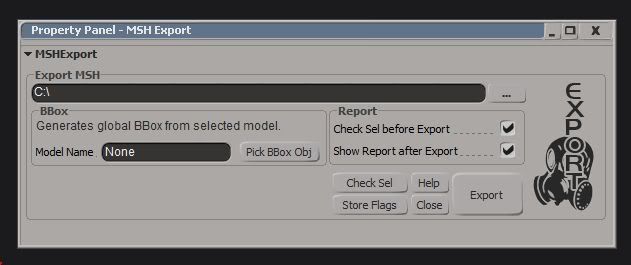
I've changed the export dialog a bit. I think it's better like this. You can see the path better, removed some(IMO redundant) flags, added some flags concerning reports(to reduce clicks when exporting models you know will work). The export will ignore the bbox if a model with the entered name doesn't exist. Now every setting you can make will be stored on export or when pressing the Store Flags button. Also, I think the general look improved a bit, too.
Re: XSI ZETools
Posted: Wed Mar 21, 2012 5:38 pm
by Slime615
Here it is just before I click Export. I clicked Check Sel - But no problems showed.
Hidden/Spoiler:
Re: XSI ZETools
Posted: Wed Mar 21, 2012 5:39 pm
by Marth8880
Looks fantastic! Also, I see you used the Mass Effect (Slider Thin) font for the graphic, hehe. 8D
Re: XSI ZETools
Posted: Thu Mar 22, 2012 11:59 am
by ANDEWEGET
@Slime615:
Check Sel doesn't check hierarchy or the MSHProperty.
You shouldn't export the MSHMaterials null, so drag&drop it onto Scene_Root.
Disable Export Global BBox.
It's more efficient to use nulls as hardpoints than models, but that should not break the .msh.
Maybe just select dummyroot, then press Export.
Last thing: Double click the item with the orange 'C' icon(named MSHProperty) and check if a material with the name exists. Try reassigning the material via the material manager, too.
@Marth:
Thanks! The font's called Koshgarian or something, could be from Mass Effect, I use it because it looks pretty similar to XSI's UI font though.