Lighting problem [Solved]

In this forum you will find and post information regarding the modding of Star Wars Battlefront 2. DO NOT POST MOD IDEAS/REQUESTS.

Moderator: Moderators

Post Reply
User avatar
Marvel4
Rebel Colonel
Rebel Colonel
Posts: 556
Joined: Mon Jun 21, 2010 12:57 pm
Projects :: Marvel4s BF1 Conversion Pack + Era Mod

Lighting problem [Solved]

Post by Marvel4 »

I'm currently working on a Bespin: Cloud City conversion and I have some problems with the lighting in the carbon freeze chamber:
Image

As you can see, the wall looks really weird. The forklift is purple because I changed the lights (just for testing of course), while the wall isn't affected at all. But, in ZE, the dark parts of the walls look purple too.

I compared this with the BF1 map and the wall should have the color of the dark parts.

Any ideas how to solve this?
AQT
Gametoast Staff
Gametoast Staff
Posts: 4910
Joined: Sat Nov 03, 2007 4:55 pm
Location: SoCal, USA

Re: Lighting problem

Post by AQT »

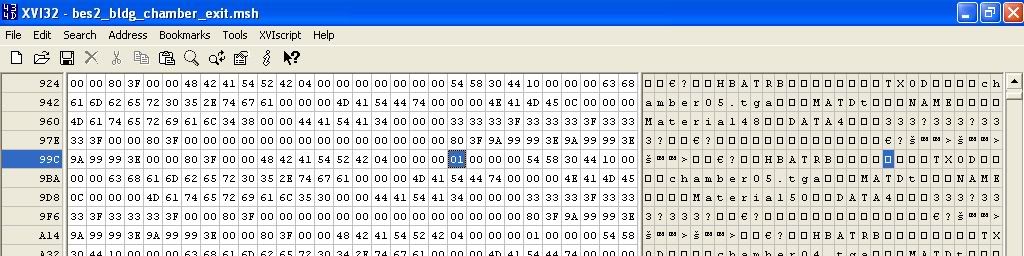
1. Open up the file bes2_bldg_chamber_exit.msh in a hex editor.

2. Go to this section (before the second chamber05.tga):
Hidden/Spoiler:
Image
3. See the 01 that is highlighted? Change it to 00.

4. Save the file. The problem should be fixed (after munging of course).
User avatar
Marvel4
Rebel Colonel
Rebel Colonel
Posts: 556
Joined: Mon Jun 21, 2010 12:57 pm
Projects :: Marvel4s BF1 Conversion Pack + Era Mod

Re: Lighting problem

Post by Marvel4 »

Thank you so much! Worked perfectly! :D
Post Reply