Page 1 of 3
How do I import files into XSI? [Solved]
Posted: Fri Mar 06, 2015 1:38 am
by jojo3450
How do I put .mesh files into the program and how do I extract them thanks I a noob at this Im good with texture, hex, and .lua but not this thanks
Re: how do I import files into xsi
Posted: Fri Mar 06, 2015 9:10 am
by Anakin
Re: how do I import files into xsi
Posted: Fri Mar 06, 2015 2:11 pm
by jedimoose32
Also check out Ande's XSI-ZE Tool
HERE. It's very easy to use, and imports/exports anything you'll need except cloth.
Re: how do I import files into xsi
Posted: Sat Mar 07, 2015 6:18 pm
by jojo3450
ok I download and put it in the ad-don folder So on soft image where do I go to export I know im a noob sorry
Re: how do I import files into xsi
Posted: Sat Mar 07, 2015 7:36 pm
by jedimoose32
Make sure all the stuff you want to export is under a null. Middle click the null and then go to the ZE Tools menu at the top and click Export MSH
Re: how do I import files into xsi
Posted: Sat Mar 07, 2015 9:12 pm
by jojo3450
does it have to be soft image foundation? because im using xsi mod tools
Re: how do I import files into xsi
Posted: Sat Mar 07, 2015 9:21 pm
by jedimoose32
I'm not sure. I have a full license and it works fine for me. If you have the mod tool I think the Pandemic XSI plugin is what you want. Check out the XSI FAQ thread in the 3D modeling sub for more details.
Re: how do I import files into xsi
Posted: Sun Mar 08, 2015 5:39 am
by Anakin
You download xsi modtools 7.5, than you dowload ZETools and put it in the addon folder just the way the readme tell you to do. next you restart XSI mod tools, and in the menu should be a new entry called ZE Tools
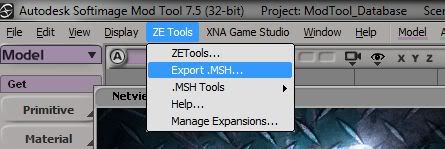
and there you go to export/import msh files.
Re: how do I import files into xsi
Posted: Sat Mar 28, 2015 2:50 pm
by jojo3450
so i download xsi zetools and put the zip in the addon folder and opened the program but its not there i have the free mod tool if that changes anything , do i need python
Re: how do I import files into xsi
Posted: Sat Mar 28, 2015 6:02 pm
by Anakin
Your on a good way. Have you read the readme? There's the answer
Re: how do I import files into xsi
Posted: Sat Mar 28, 2015 7:05 pm
by jojo3450
ok i tried about 4 older versions same thing doesnt work
these are the steps i do:
1.I downloaded 7.5 free mod tools
2. I downloaded zetools
3. I put it in addon (i put it in compressed(zip) file but i tried it non compressed)
4. I open soft image
5.check where u told me but its not there
am i missing something do i need python?
Re: how do I import files into xsi
Posted: Sat Mar 28, 2015 7:27 pm
by GAB
jojo3450 wrote:3. I put it in addon (i put it in compressed(zip) file but i tried it non compressed)
Sorry, but were you seriously expecting the software to read a compressed file? It must be uncompressed in order to work.

jojo3450 wrote:am i missing something do i need python?
Yes, you need python.
I'd suggest you follow this
Download & Installation guide from ZETools' page. It contains all the steps and links to everything you will need to install.
Re: how do I import files into xsi
Posted: Sat Mar 28, 2015 8:00 pm
by jojo3450
so i install it and doesnt work i did everything
-1st i downloaded both of the python needed and installed it with everything at default
then i put the zetools but dont work
Re: how do I import files into xsi
Posted: Sun Mar 29, 2015 1:08 am
by Marth8880
jedimoose32 wrote:Make sure all the stuff you want to export is under a null. Middle click the null and then go to the ZE Tools menu at the top and click Export MSH
Off-topic: Actually, with the ZE Tools, you don't have to put everything under a null, nor do you need to branch select it when exporting. You can put everything under your main mesh object if you want; when you export the msh, all children of the parent main mesh object will be exported, even if you just normally select only that parent object.

Re: how do I import files into xsi
Posted: Sun Mar 29, 2015 1:12 am
by jedimoose32
Wow, TIL...
Thanks for the tip. Although the old procedure is so deeply burnt into my brain at this point, and it may take me a lot of time/effort to actually change.

Re: how do I import files into xsi
Posted: Sun Mar 29, 2015 1:13 am
by Marth8880
Heh, no problem. The main reason why I never branch select anymore is because my mouse's middle-click is half-dead.

Re: how do I import files into xsi
Posted: Sun Mar 29, 2015 1:15 am
by jedimoose32
Ouch. I know that feel.
Re: how do I import files into xsi
Posted: Sun Mar 29, 2015 1:24 am
by Marth8880
Right? It makes modeling in Maya *incredibly* difficult since it's used to pan around the scene, especially considering the fact that you can't really change the mouse mappings in Maya because Autodesk can't design software UIs worth crap.
Anyways, jojo, you *may* need to do something with environment variables. I wanna say I had to at one point... Can anyone confirm this?
Also, jojo, what's the full path of your XSIZETools folder? It should be something along the lines of C:\Users\Aaron\Autodesk\Softimage_2012\Addons\XSIZETools replacing "Softimage_2012" with whatever Mod Tool uses for its folder name.

Re: how do I import files into xsi
Posted: Sun Mar 29, 2015 2:31 pm
by jojo3450
where do i install python can u give me the path thanks
also i re installed xsi to
is that correct or do i leave it at default.
Re: how do I import files into xsi
Posted: Sun Mar 29, 2015 4:27 pm
by Marth8880
Python should be installed to its default installation path.
I asked what the directory of the XSIZETools folder was, not XSI itself. XSI itself should be installed in Program Files, its default location (though *technically* its install location shouldn't matter).
When you download the ZE Tools and you extract the archive, you need to place the folder called "XSIZETools" in C:\Users\Aaron\Autodesk\Softimage_2012\Addons replacing "Softimage_2012" with whatever Mod Tool uses for its folder name and "Aaron" with your Windows username.