
You want to import the msh chunks from Ani. First, open up Ani's msh, and export the following:
c_ribcage
c_r_calf
c_r_thigh
c_r_thigh_skirt2
c_r_thigh_skirt1
c_l_calf
c_l_thigh_skirt1
c_l_thigh_skirt2
c_l_thigh
c_pelvis_skirt1
c_pelvis_skirt2
rep_inf_ep3anakin_skirt
and save them to your desktop. Then, open up the .msh you are wanting to put them in, and select the bottom chunk, and select export after. Then do that for each of those chunks.
The Clone Wars Darth Maul editing help [Solved]
Moderator: Moderators
-
Kingpin

- Jedi

- Posts: 1096
- Joined: Fri Sep 13, 2013 7:09 pm
- Projects :: The Sith Wars II
- Location: Denver, CO
- Contact:
-
Indytotof
- Chief Warrant Officer

- Posts: 348
- Joined: Fri Jun 06, 2014 6:58 am
- Projects :: SWBF2 Sides Overhaul Mod
- xbox live or psn: No gamertag set
- Location: Senlis, France
Re: The Clone Wars Darth Maul editing help.
To be sure I didn't make any mistakes, what do you exactly means by "select the bottom chunk" ? Can you show me that by a picture of your own msheditor (using a stock .msh) please ?Kingpin wrote:You want to import the msh chunks from Ani. First, open up Ani's msh, and export the following:
c_ribcage
c_r_calf
c_r_thigh
c_r_thigh_skirt2
c_r_thigh_skirt1
c_l_calf
c_l_thigh_skirt1
c_l_thigh_skirt2
c_l_thigh
c_pelvis_skirt1
c_pelvis_skirt2
rep_inf_ep3anakin_skirt
and save them to your desktop. Then, open up the .msh you are wanting to put them in, and select the bottom chunk, and select export after. Then do that for each of those chunks.
Again, thank you for your help.
-
Kingpin
- Jedi
- Posts: 1096
- Joined: Fri Sep 13, 2013 7:09 pm
- Projects :: The Sith Wars II
- Location: Denver, CO
- Contact:
Re: The Clone Wars Darth Maul editing help.
I simply mean that you want to insert all the chunks after the last chunk in your model. Just scroll down to the bottom, click it, then insert after.
-
Indytotof
- Chief Warrant Officer
- Posts: 348
- Joined: Fri Jun 06, 2014 6:58 am
- Projects :: SWBF2 Sides Overhaul Mod
- xbox live or psn: No gamertag set
- Location: Senlis, France
Re: The Clone Wars Darth Maul editing help.
All the things on bold are the ones I cannot find on the rep_inf_ep3anakin.msh. I've find the others but not them.Kingpin wrote:You want to import the msh chunks from Ani. First, open up Ani's msh, and export the following:
c_ribcage
c_r_calf
c_r_thigh
c_r_thigh_skirt2
c_r_thigh_skirt1
c_l_calf
c_l_thigh_skirt1
c_l_thigh_skirt2
c_l_thigh
c_pelvis_skirt1
c_pelvis_skirt2
rep_inf_ep3anakin_skirt
and save them to your desktop. Then, open up the .msh you are wanting to put them in, and select the bottom chunk, and select export after. Then do that for each of those chunks.
Help please ?
-
AQT
- Gametoast Staff

- Posts: 4910
- Joined: Sat Nov 03, 2007 4:55 pm
- Location: SoCal, USA
Re: The Clone Wars Darth Maul editing help.
The other ones are only found in the cloaked version of the model. Since you're only using the skirt, you don't need them, which are only there for the cloak.
-
Indytotof
- Chief Warrant Officer
- Posts: 348
- Joined: Fri Jun 06, 2014 6:58 am
- Projects :: SWBF2 Sides Overhaul Mod
- xbox live or psn: No gamertag set
- Location: Senlis, France
Re: The Clone Wars Darth Maul editing help.
Yep see them know. I've exported them, just in case.AQT wrote:The other ones are only found in the cloaked version of the model. Since you're only using the skirt, you don't need them, which are only there for the cloak.
Thanks AQT.
EDIT : After some editing, I've got this:
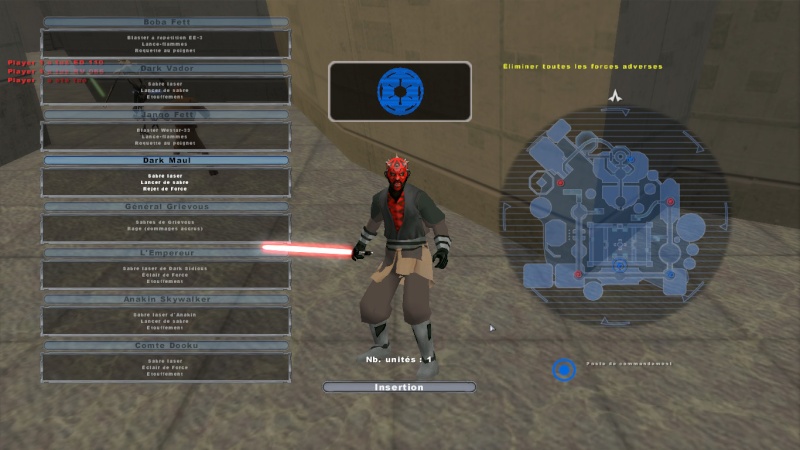
I've used the rep_inf_macewindu_skirt for the test.
Now, with my new knowledge about adding clothes to somes units, I'm going to redonne this with the anakin's one.
I've some questions. In fact, only two:
> How can I resize the skirt ?
> How can I recolored the skirt ?
Thanks and add your impressions about my reskinning, I want to know your opinion.
-
thelegend
- Sith

- Posts: 1433
- Joined: Thu Jan 23, 2014 6:01 am
- Projects :: Star Wars - Battlefront III Legacy
- xbox live or psn: El_Fabricio#
- Location: Right behind you :)
Re: The Clone Wars Darth Maul editing help.
For recolor just edit the macewindu.tga and look for the place in the texture for his skirt.
-
Indytotof
- Chief Warrant Officer
- Posts: 348
- Joined: Fri Jun 06, 2014 6:58 am
- Projects :: SWBF2 Sides Overhaul Mod
- xbox live or psn: No gamertag set
- Location: Senlis, France
Re: The Clone Wars Darth Maul editing help.
After doing what thelegend says, I finally got this:
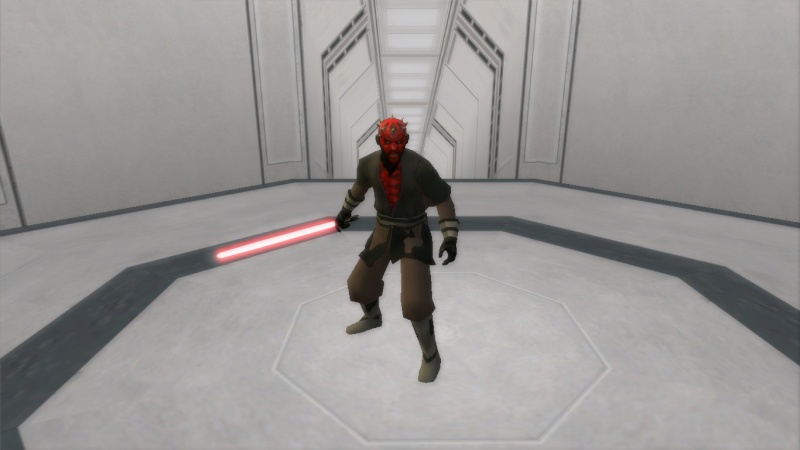
That's bring two problems:
- There is "holes" on the skirt textures, as you can see. There is a way to fix thoses "holes" ?
- It's also modified the Mace Windu model ingame. There is a way to make Mace back to normal without getting the skirt on Maul to the beginning ?
And reminder:
Thanks all.
That's bring two problems:
- There is "holes" on the skirt textures, as you can see. There is a way to fix thoses "holes" ?
- It's also modified the Mace Windu model ingame. There is a way to make Mace back to normal without getting the skirt on Maul to the beginning ?
And reminder:
because he is too large. I want to make it the same size as the one on Count Dooku. But if it impossible, I will keep the skirt as it own regular size.Indytotof wrote:> How can I resize the skirt ?
Thanks all.
-
Kingpin
- Jedi
- Posts: 1096
- Joined: Fri Sep 13, 2013 7:09 pm
- Projects :: The Sith Wars II
- Location: Denver, CO
- Contact:
Re: The Clone Wars Darth Maul editing help.
I am not sure,but maybe if you scaled the Mace Windu msh to 1.11 or something, it could work. Just a thought.
-
Indytotof
- Chief Warrant Officer
- Posts: 348
- Joined: Fri Jun 06, 2014 6:58 am
- Projects :: SWBF2 Sides Overhaul Mod
- xbox live or psn: No gamertag set
- Location: Senlis, France
Re: The Clone Wars Darth Maul editing help.
How can I do that ?Kingpin wrote:I am not sure,but maybe if you scaled the Mace Windu msh to 1.11 or something, it could work. Just a thought.
> I'm going to re-skinned again Darth Maul, since I discover how to do that properly.
-
TWINKEYRUNAWAY
- Lieutenant General

- Posts: 730
- Joined: Fri Aug 17, 2012 3:13 pm
- Projects :: Empire Rising
- xbox live or psn: No gamertag set
- Location: 411Remnant
- Contact:
Re: The Clone Wars Darth Maul editing help.
Are you using nedarb7's skin as a base? (you know the one you didnt think was show accurate, either though it does a good enough job in my honest opinion).
Also were you planning on using the combo's he created?
Also were you planning on using the combo's he created?
-
Indytotof
- Chief Warrant Officer
- Posts: 348
- Joined: Fri Jun 06, 2014 6:58 am
- Projects :: SWBF2 Sides Overhaul Mod
- xbox live or psn: No gamertag set
- Location: Senlis, France
Re: The Clone Wars Darth Maul editing help.
Yep, it's the nedarb7's skin.TWINKEYRUNAWAY wrote:Are you using nedarb7's skin as a base? (you know the one you didnt think was show accurate, either though it does a good enough job in my honest opinion (Indytotof : For me too. It's just the color that not the same as the real TCW version of Darth Maul).
Also were you planning on using the combo's he created?
I've changing the animation however.
EDIT : Here is the new re-skinning of TCW Darth Maul:
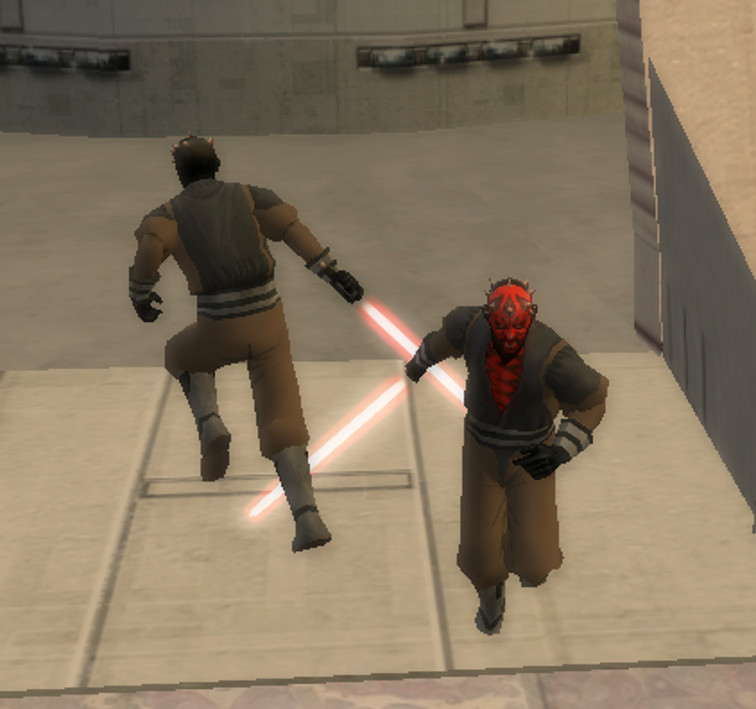
I know it isn't THAT great but, with my little talent, I find it's a good beginning. Isn't ?
With the picture, you can see the whole reskinning of Maul.
-
thelegend
- Sith
- Posts: 1433
- Joined: Thu Jan 23, 2014 6:01 am
- Projects :: Star Wars - Battlefront III Legacy
- xbox live or psn: El_Fabricio#
- Location: Right behind you :)
Re: The Clone Wars Darth Maul editing help.
Looks neat.
Look in msh section in Faq thread for scaling up objects. (e.g. the mace windu)
Look in msh section in Faq thread for scaling up objects. (e.g. the mace windu)
-
MileHighGuy
- Jedi
- Posts: 1194
- Joined: Fri Dec 19, 2008 7:58 pm
Re: The Clone Wars Darth Maul editing help.
to make the skirt bigger you have to use xsi. scaling up mace windu's msh with .option files and .odf files wont change the actual size of the skirt for when you try to hex edit it to maul again.
EDIT: also have you seen the maul model in this asset pack?
viewtopic.php?f=64&t=13002&hilit=maul
It has actual robot legs. The images are broken in the topic but it does look pretty cool.
EDIT: also have you seen the maul model in this asset pack?
viewtopic.php?f=64&t=13002&hilit=maul
It has actual robot legs. The images are broken in the topic but it does look pretty cool.
-
Kingpin
- Jedi
- Posts: 1096
- Joined: Fri Sep 13, 2013 7:09 pm
- Projects :: The Sith Wars II
- Location: Denver, CO
- Contact:
Re: The Clone Wars Darth Maul editing help.
I used that Maul, it looks nice if you like the Clone Wars.MileHighGuy wrote:to make the skirt bigger you have to use xsi. scaling up mace windu's msh with .option files and .odf files wont change the actual size of the skirt for when you try to hex edit it to maul again.
EDIT: also have you seen the maul model in this asset pack?
viewtopic.php?f=64&t=13002&hilit=maul
It has actual robot legs. The images are broken in the topic but it does look pretty cool.
-
Indytotof
- Chief Warrant Officer
- Posts: 348
- Joined: Fri Jun 06, 2014 6:58 am
- Projects :: SWBF2 Sides Overhaul Mod
- xbox live or psn: No gamertag set
- Location: Senlis, France
Re: The Clone Wars Darth Maul editing help.
I'm wondering...
Did I can create my own skirt (.tga, .odf and .msh) using a pre-existing one ?
EDIT : I just don't know how XSI works or what I've to do when the program is open, since he seems to doesn't [Watch your language please. -Staff] want to open .tga or .msh files from Mace Windu.
Anybody help ?
Did I can create my own skirt (.tga, .odf and .msh) using a pre-existing one ?
EDIT : I just don't know how XSI works or what I've to do when the program is open, since he seems to doesn't [Watch your language please. -Staff] want to open .tga or .msh files from Mace Windu.
Anybody help ?
-
MileHighGuy
- Jedi
- Posts: 1194
- Joined: Fri Dec 19, 2008 7:58 pm
Re: The Clone Wars Darth Maul editing help.
you have to install the ZEtools plugin that ANDEWEGET made for XSI Mod Tool. XSI doesn't import .msh files without the plugin. And really, XSI is a bit difficult to learn.
-
Indytotof
- Chief Warrant Officer
- Posts: 348
- Joined: Fri Jun 06, 2014 6:58 am
- Projects :: SWBF2 Sides Overhaul Mod
- xbox live or psn: No gamertag set
- Location: Senlis, France
Re: The Clone Wars Darth Maul editing help.
OK, I didn't understand how to create a cloth with XSI Mod Tool...
Did someone can send me a tutorial to help me how it's worked ?
Thanks.
Did someone can send me a tutorial to help me how it's worked ?
Thanks.
-
Kingpin
- Jedi
- Posts: 1096
- Joined: Fri Sep 13, 2013 7:09 pm
- Projects :: The Sith Wars II
- Location: Denver, CO
- Contact:
Re: The Clone Wars Darth Maul editing help.
I'd highly recommend you don't try and learn XSI quite yet; wait until you are much more experienced. Stick to Hex Editing cloth for now, as that is much easier. XSI is one of the, if not the, most difficult thing in SWBFII Modding.
-
Indytotof
- Chief Warrant Officer
- Posts: 348
- Joined: Fri Jun 06, 2014 6:58 am
- Projects :: SWBF2 Sides Overhaul Mod
- xbox live or psn: No gamertag set
- Location: Senlis, France
Re: The Clone Wars Darth Maul editing help.
The problem is that if I modify anything, the original model will have this modification too, and I don't it to happen. Any idea to prevent that to happen ?Kingpin wrote:I'd highly recommend you don't try and learn XSI quite yet; wait until you are much more experienced. Stick to Hex Editing cloth for now, as that is much easier. XSI is one of the, if not the, most difficult thing in SWBFII Modding.
EDIT :
Guys, when I'm trying to munge my side, I got this:
Code: Select all
/Common was unexpected at this timeI truly need help here.
EDIT 2 : I'm actually thinking about changing (again) Maul's animation for the Aayla's one. I know how to do that, that's not the question. The question is: I want, i side of his red lightsaber, I want to add a blacksaber, the one of this thread to be exact. So I've created one odf for the new weapon, looking at the readme from the blacksaber and Aayla's sabers' odf and here is the result:
Hidden/Spoiler:
EDIT 3 : I looked at the Tatooine Luke model on BF2 Mod Tools. I wonder what is "all_inf_tatooinelukeskywalker_cloth" since the model have the skirt I'm looking for. Did it is only the skirt or the whole cloth ?
EDIT 4 : Munging problem fix, modding can continue now !
EDIT 5 : The new animation for Maul make the game crash. I don't know why since I do all right... So the animation will be the same and no blacksaber added.
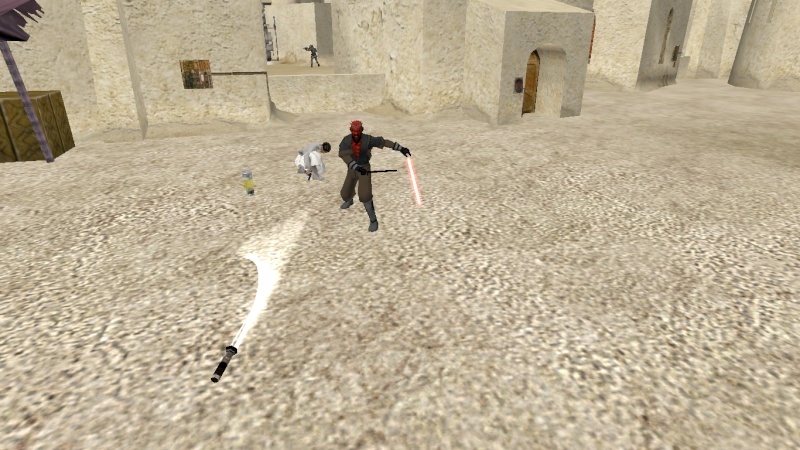
EDIT 6 : I've successfully added a new animation for Maul and the blacksaber but... well... see for yourself:
Hidden/Spoiler:
Hidden/Spoiler:
