How to create models in XSI and other 3D applications and make them work in Battlefront 1 & 2. Post models, tips for application usage and share anything XSI, 3DMax, SketchUp, etc.
Moderator: Moderators
jedi_pilot
Command Sergeant Major
Posts: 288Joined: Sat Sep 15, 2007 2:09 pm
Post
by jedi_pilot Wed Jan 30, 2008 5:38 pm
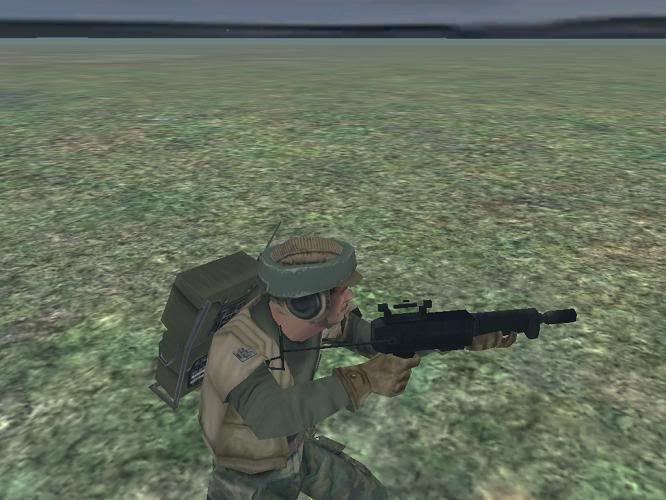
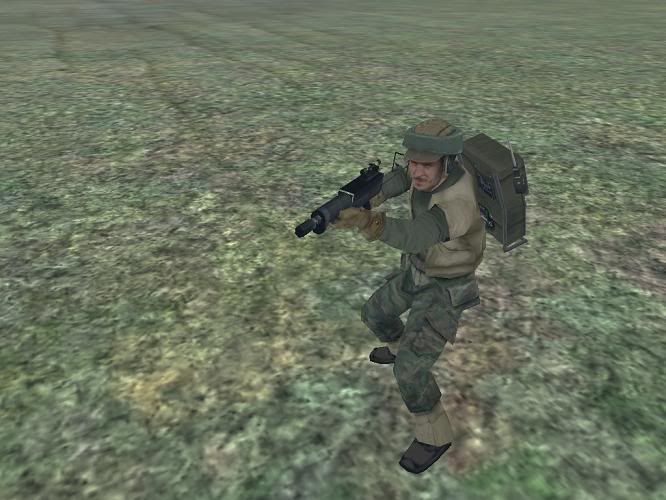
Well, I exported my model into SWBFII with XSI 5.11 trial version and here's the screenshots
:
As you can see, the model worked out ok, but there's a serious graphics glitch in the scope and the front of the gun
. What is the problem
???
Maveritchell
Jedi Admin
Posts: 7366Joined: Mon Aug 21, 2006 11:03 pm
Post
by Maveritchell Wed Jan 30, 2008 6:05 pm
Looks like the game removed some polygons. That tends to happen when polygons are really close together on a model.
Caleb1117
2008 Most Original Avatar
Posts: 3096Joined: Sun Aug 20, 2006 5:55 pmProjects :: No Mod project currently.xbox live or psn: No gamertag setLocation: X-Fire: caleb1117 ಠ_ಠ
Post
by Caleb1117 Wed Jan 30, 2008 10:21 pm
That can be fixed if you triangulate those polys.
jedi_pilot
Command Sergeant Major
Posts: 288Joined: Sat Sep 15, 2007 2:09 pm
Post
by jedi_pilot Thu Jan 31, 2008 8:02 am
Caleb1117 wrote: That can be fixed if you triangulate those polys.
How do I triangulate polys
???
AceMastermind
Gametoast Staff
Posts: 3285Joined: Mon Aug 21, 2006 6:23 am
Contact:
Post
by AceMastermind Thu Jan 31, 2008 9:35 am
You could do it manually with the Add edge tool (\ key) or you could select the area of polygons that you want triangulated or just select the whole object and go:
Model>Modify-Poly. Mesh>Triangulate
FragMe!
Gametoast Staff
Posts: 2244Joined: Sat May 13, 2006 12:34 amProjects :: Not sure keep changing my mind.Games I'm Playing :: F1 and SWBFxbox live or psn: No gamertag setLocation: Origin name GT_FragMe
Contact:
Post
by FragMe! Thu Jan 31, 2008 10:02 am
Caleb1117 wrote: That can be fixed if you triangulate those polys.
I have taught you well my young Padewan
jedi_pilot
Command Sergeant Major
Posts: 288Joined: Sat Sep 15, 2007 2:09 pm
Post
by jedi_pilot Thu Jan 31, 2008 12:50 pm
I'll try that out
, but will it change the shape of my gun in any way???
Caleb1117
2008 Most Original Avatar
Posts: 3096Joined: Sun Aug 20, 2006 5:55 pmProjects :: No Mod project currently.xbox live or psn: No gamertag setLocation: X-Fire: caleb1117 ಠ_ಠ
Post
by Caleb1117 Thu Jan 31, 2008 1:43 pm
FragMe! wrote: Caleb1117 wrote: That can be fixed if you triangulate those polys.
I have taught you well my young Padewan
Lol, props to the master.
No, it won't change its shape.
jedi_pilot
Command Sergeant Major
Posts: 288Joined: Sat Sep 15, 2007 2:09 pm
Post
by jedi_pilot Thu Jan 31, 2008 3:19 pm
Ok, I'll triangulate when I get to my model later. Thank you, thank you, and thank you
.
Challenger33
Lieutenant General
Posts: 726Joined: Wed Aug 23, 2006 3:44 pmProjects :: No Mod project currently.xbox live or psn: No gamertag setLocation: Building a legion of papercraft models.
Contact:
Post
by Challenger33 Sun Feb 03, 2008 11:32 pm
Ah, so
that's what happened with my podracer. I had thought that it was just the model
.
Taivyx
2008 Best Games Related Avatar
Posts: 1706Joined: Thu Jun 07, 2007 3:34 pmProjects :: Terra Strife - discontinuedGames I'm Playing :: nonexbox live or psn: No gamertag set
Contact:
Post
by Taivyx Mon Feb 04, 2008 2:25 pm
Well my original M4 carbine had that problem, and it was already triangulated, so....
Ah well, doesn't matter, I'm redo-ing it anyway.

 :
:
 . What is the problem
  ???
???



 .
.
