Page 1 of 2
Texture not showing up on my Milkshape 3d model.
Posted: Sat Oct 24, 2009 10:15 pm
by swado95
Hi Im trying to get my model in game and its in but it has no textures and when I go to play the top part of my model is gone. Any ideas why its doing this. I have no errors in log
Re: Texture not showing up on my milkshade model.
Posted: Sat Oct 24, 2009 11:41 pm
by CodaRez
swado95 wrote:Hi Im trying to get my model in game and its in but it has no textures and when I go to play the top part of my model is gone. Any ideas why its doing this. I have no errors in log
Got a screenie of ur model buddy?
(in XSI)
Re: Texture not showing up on my milkshade model.
Posted: Sat Oct 24, 2009 11:55 pm
by RogueKnight
CodaRez wrote:swado95 wrote:Hi Im trying to get my model in game and its in but it has no textures and when I go to play the top part of my model is gone. Any ideas why its doing this. I have no errors in log
Got a screenie of ur model buddy?
(in XSI)
He doesn't have xsi, he's using Milkshape.
Re: Texture not showing up on my milkshade model.
Posted: Sun Oct 25, 2009 9:15 am
by swado95
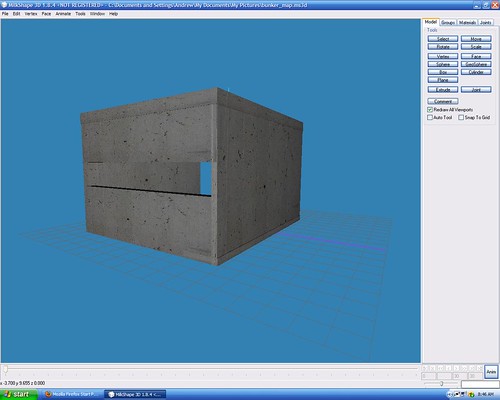
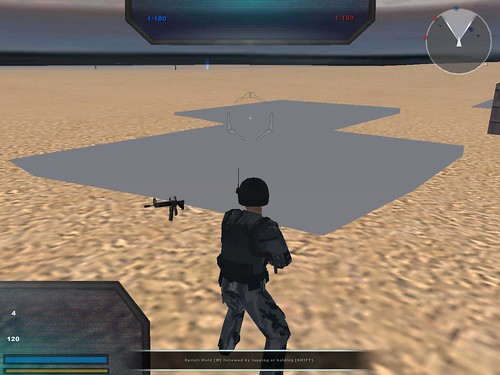
well this is what they look like.
how it should be.
how it is
also im trying to import a tree into milkshade can I do the with bconstructor or do I need something else.
How to munge textures.
Posted: Sun Oct 25, 2009 10:01 am
by swado95
Hi im trying to munge my textures together so my model will work. how do i do that?
Re: How to munge textures.
Posted: Sun Oct 25, 2009 10:01 am
by Fiodis
How about making a custom side, loading it in the LUA, and munging it?
Check the FAQ thread.
Re: How to munge textures.
Posted: Sun Oct 25, 2009 10:28 am
by swado95
no not like that like munging them together like for example i have 3 textures a,b,and c but i whant them all to be in one file called abc like im trying to get all my tga files for my model into one.
Re: How to munge textures.
Posted: Sun Oct 25, 2009 10:47 am
by DarthD.U.C.K.
you cant do that easily, first you have to create a texture that includes all textureparts and has a proper resolution of a pwer of two
then you have to edit the model UVs with a 3d modelingprogramm to fit them on the new texture
but why do you want to do that? no model crashes because it has multiple textures..
Re: How to munge textures.
Posted: Sun Oct 25, 2009 11:06 am
by swado95
well then why is it coming up with only one part of my model and its white?
Re: Texture not showing up on my milkshade model.
Posted: Sun Oct 25, 2009 12:26 pm
by RogueKnight
swado95 wrote:well this is what they look like.
how it should be.
how it is
also im trying to import a tree into milkshade can I do the with bconstructor or do I need something else.
Merge all of your meshes into one then re-export.
Re: How to munge textures.
Posted: Sun Oct 25, 2009 12:55 pm
by Fiodis
swado95 wrote:well then why is it coming up with only one part of my model and its white?
Depends. How did you go about texturing it?
Re: Texture not showing up on my milkshade model.
Posted: Sun Oct 25, 2009 2:12 pm
by swado95
DarthRogueKnight wrote:Merge all of your meshes into one then re-export.
ok how do i merge together?
Re: Texture not showing up on my milkshade model.
Posted: Sun Oct 25, 2009 2:50 pm
by RogueKnight
swado95 wrote:ok how do i merge together?
The regroup button?
Re: How to munge textures.
Posted: Sun Oct 25, 2009 8:33 pm
by swado95
What do u mean. Well i put on the textures on in milkshade if that's what you mean? Cant you murge them together with gimp or something. well anyways my model is fully there in zeroeditor but its white then its only the bottom part and its white in the game.
Re: How to munge textures.
Posted: Sun Oct 25, 2009 9:07 pm
by Fiodis
Hang on, is this the same problem as in
this thread?
Re: How to munge textures.
Posted: Mon Oct 26, 2009 4:36 pm
by swado95
well im trying to find out how to merge textures to solve this problem.
Re: How to munge textures.
Posted: Mon Oct 26, 2009 6:47 pm
by Fiodis
Perhaps if you followed the advice in the other thread you may get somewhere. I can assure you this is a modelling issue, not a skinning issue. There is something wrong with your model setup/ UV setup/export, not your texture.
Indeed, you only need one thread to address one question, not two.
Re: Texture not showing up on my Milkshape 3d model.
Posted: Mon Oct 26, 2009 6:57 pm
by swado95
well what do u mean by regroup and i got texture working but it still only has one part.
EDIT
plz I really need to get this to work if someone could give me there xfire so they can help guide me trought this that would be great!
:atatpilot: :maulsaber: :atatpilot:
Re: Texture not showing up on my Milkshape 3d model.
Posted: Mon Oct 26, 2009 7:11 pm
by RogueKnight
I already told you, all you have to do is regroup all of your meshes into one.
Re: Texture not showing up on my Milkshape 3d model.
Posted: Mon Oct 26, 2009 7:17 pm
by swado95
Ya i get that but how? I dont see this regroup button you speak of?
-what is it found under.
-what program Milkshade or Gimp.
-how do I use it.
This is all stuff I need to know not just the regroup button. THERE ARE MILLIONS OF BUTTONS and 110 of them are on my keyboard.