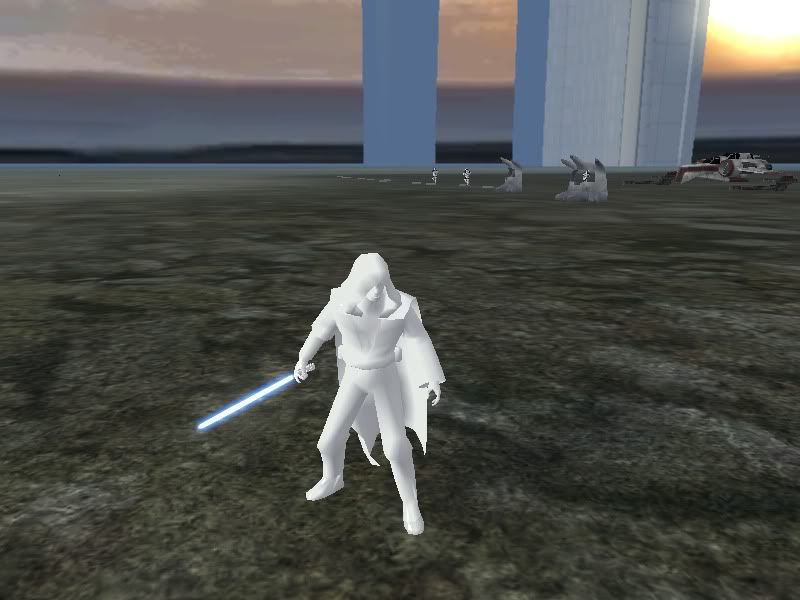
Cloaked Anakin missing texture ingame [Solved]

In this forum you will find and post information regarding the modding of Star Wars Battlefront 2. DO NOT POST MOD IDEAS/REQUESTS.

Moderator: Moderators

Post Reply
User avatar
Havoc 526
Rebel Warrant Officer
Posts: 317
Joined: Sat Apr 04, 2009 6:24 pm
Projects :: Something
Games I'm Playing :: Xenoblade Splatoon
Location: Howling at the Moon

Cloaked Anakin missing texture ingame [Solved]

Post by Havoc 526 »

I have an unusual problem that I have never encountered before. The mungelog doesn't say anything pertaining to this. For some reason, the Cloaked Anakin doesn't have a skin. Everything is there in the side folder. The original anakin model, which uses the same skin textures, is perfect, but this is weird. It even uses the same lightsaber as the original anakin, and the lightsaber is fine as well, but when used by the cloaked anakin, the lightsaber skin is missing as well!

Long story short, this is what I'm getting.
Hidden/Spoiler:
Image
501st_commander
Master Bounty Hunter
Posts: 1570
Joined: Wed Dec 10, 2008 7:48 pm

Re: Er...I don't know what to make of this.

Post by 501st_commander »

try a clean - remunge.
RogueKnight
Space Ranger
Posts: 2512
Joined: Sat Nov 22, 2008 1:50 pm
Projects :: Life. Work.
Games I'm Playing :: League of Legends
xbox live or psn: No gamertag set
Location: Washington, US

Re: Er...I don't know what to make of this.

Post by RogueKnight »

Did you rename his texture at all?
User avatar
Havoc 526
Rebel Warrant Officer
Posts: 317
Joined: Sat Apr 04, 2009 6:24 pm
Projects :: Something
Games I'm Playing :: Xenoblade Splatoon
Location: Howling at the Moon

Re: Er...I don't know what to make of this.

Post by Havoc 526 »

DarthRogueKnight wrote:Did you rename his texture at all?
No I did not. Which infuriates me so, because I didn't even touch anything that related to the model or the texture. It just...happened!

I cleaned it, now remunging. This will take a looong while, but I'll keep ya posted.
genaral_mitch
Jedi
Jedi
Posts: 1056
Joined: Fri Aug 14, 2009 12:32 am

Re: Er...I don't know what to make of this.

Post by genaral_mitch »

You might want to put his texture in the pc folder in msh too.
RogueKnight
Space Ranger
Posts: 2512
Joined: Sat Nov 22, 2008 1:50 pm
Projects :: Life. Work.
Games I'm Playing :: League of Legends
xbox live or psn: No gamertag set
Location: Washington, US

Re: Er...I don't know what to make of this.

Post by RogueKnight »

genaral_mitch wrote:You might want to put his texture in the pc folder in msh too.
That doesn't make a difference.

Open up the mesh in notepad and do a search for .tga, then rename the texture to whatever it uses.
User avatar
Havoc 526
Rebel Warrant Officer
Posts: 317
Joined: Sat Apr 04, 2009 6:24 pm
Projects :: Something
Games I'm Playing :: Xenoblade Splatoon
Location: Howling at the Moon

Re: Er...I don't know what to make of this.

Post by Havoc 526 »

Got it. It's fixed now. Thanks guys!
Post Reply