Page 1 of 1
Moving bones to make a statue
Posted: Sat Sep 26, 2015 8:36 pm
by jojo3450
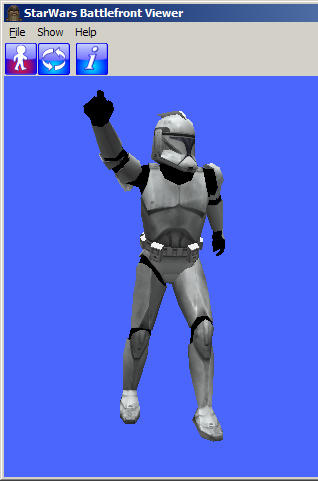
So I moved some bones from the EP3 Clone and I gave it some different pose, yet when I exported it, I opened it with the viewer yet it still has the old pose with the arms open. How can I change it, so it keeps the new pose?
Re: moving bones
Posted: Sun Sep 27, 2015 9:21 am
by AceMastermind
When you move a bone you have to re-key it or else it pops back to where the original keys were set.
Re: moving bones
Posted: Tue Sep 29, 2015 7:44 pm
by jojo3450
can you give me a quick path where its located?
Re: moving bones
Posted: Tue Sep 29, 2015 7:49 pm
by AceMastermind
No path, just press the K key on your keyboard to set a new key, you won't even have to move the timeline.
Re: moving bones
Posted: Fri Oct 02, 2015 7:51 pm
by jojo3450
do I click on a bone and press k and done?
Re: moving bones
Posted: Sat Oct 03, 2015 4:30 pm
by Anakin
Does it work?? Than you are done

Re: moving bones
Posted: Sat Oct 03, 2015 9:09 pm
by jojo3450
steps I take
1. I move the bones into a new position
2. I then click k on the bone
is that it because it does not work
Re: moving bones
Posted: Sat Oct 03, 2015 11:32 pm
by AceMastermind
1. you must have the bone selected
2. you must have rotation (press C) or translation (press V) active
3. press K
Re: moving bones
Posted: Sun Nov 15, 2015 4:22 am
by jojo3450
sorry it took along time to respond I had problems with mod tool. So Idid what you said but when i viewed it in .msh viewer and it looks the same, it doesnt change.
steps i took
1. imported ep3trooper
2. found a bone(i want to change the arms in order to make a statue of a trooper)
3. clicked it
4.moved it to new place
5. I pressed k
6. then exported it
SINCE that didn't work i switch 4 and 5 yet still doesn't work?
Re: moving bones
Posted: Sun Nov 15, 2015 10:01 am
by AceMastermind
jojo3450 wrote:... (i want to change the arms in order to make a statue of a trooper)
You should've said that in you first post.

Create your pose then select the geometry and press Freeze to break the link with the skeleton and this will preserve the pose on export.
You only need to export the geometry since you no longer need the skeleton.
Moving a clone trooper into a new position in order to make
Posted: Sun Feb 21, 2016 8:57 pm
by jojo3450
So I want to move a clone trooper into a new postion because I wan to make a statue, but every time I move it and export it, it looks the same before I moved it. I am moving the bones around but they pop back into place when exported how can I keep the bones to stay in place when I export it?
Re: Moving bones to make a statue
Posted: Sun Feb 21, 2016 10:16 pm
by AceMastermind
What's wrong with the info already given?
You've been trying to do this since last September man, took 2 minutes to do this:
*topics merged*