Page 1 of 1
Is there a way to copy the exact texturing to another model?
Posted: Fri Dec 31, 2010 1:09 am
by redgroupclan
I created a model made out of separate parts in XSI Mod Tools 6, not intending to use it for BF2. I changed my mind and decided to use it for BF2. When I read a tutorial, it said I needed to merge all of the individual primitives into one big object. I did this. Unfortunately, the texture doesn't carry over to the one big object. I retextured most of it, and got most of the texture to be just like the texture on the original model, but there's 1 part that I can't get to look like the original primitive. I don't know how to mold the texture support box. Unlike the other ones, this texture support box is rotated, making the situation very hard.
Is there some way to copy the texture layout from the original primitive to the corresponding part on the merged object?
Re: Is there a way to copy the exact texturing to another mo
Posted: Fri Dec 31, 2010 5:46 am
by DarthD.U.C.K.
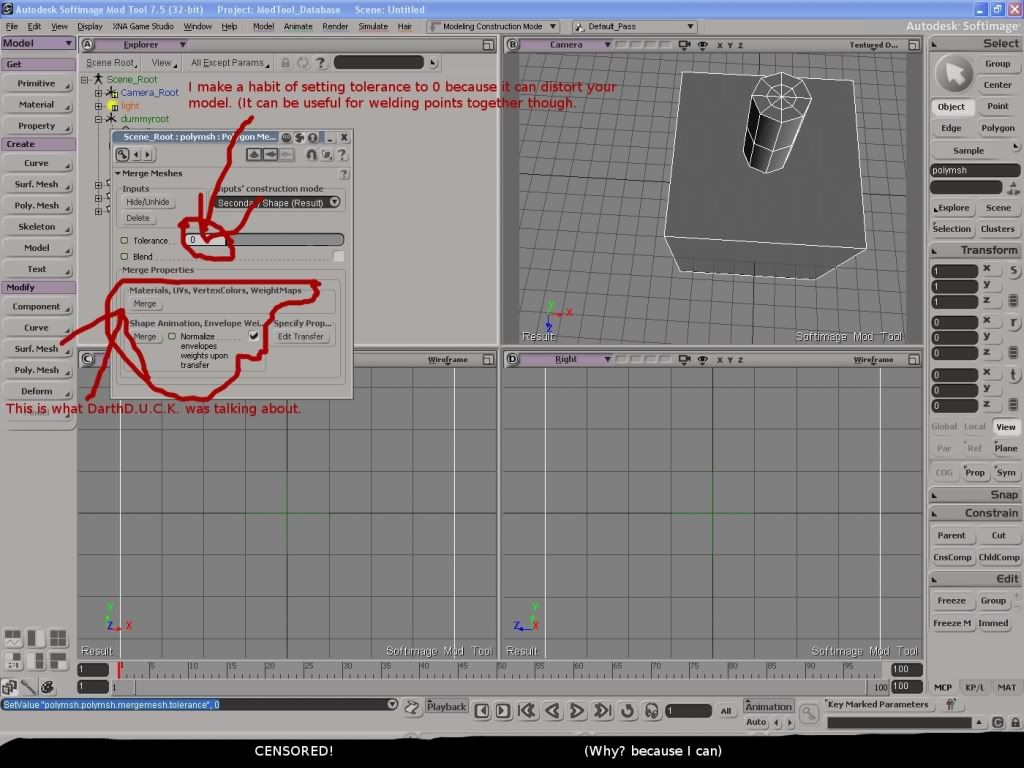
merge them again and click the "merge"-button under "Maerials,UVs,VertexColors,WeightMaps"
Re: Is there a way to copy the exact texturing to another mo
Posted: Fri Dec 31, 2010 10:07 pm
by redgroupclan
DarthD.U.C.K. wrote:"Maerials,UVs,VertexColors,WeightMaps"
I'm not sure what you mean by this.

I can't find another merge button.
Re: Is there a way to copy the exact texturing to another mo
Posted: Sat Jan 01, 2011 1:57 am
by AgentSmith_#27
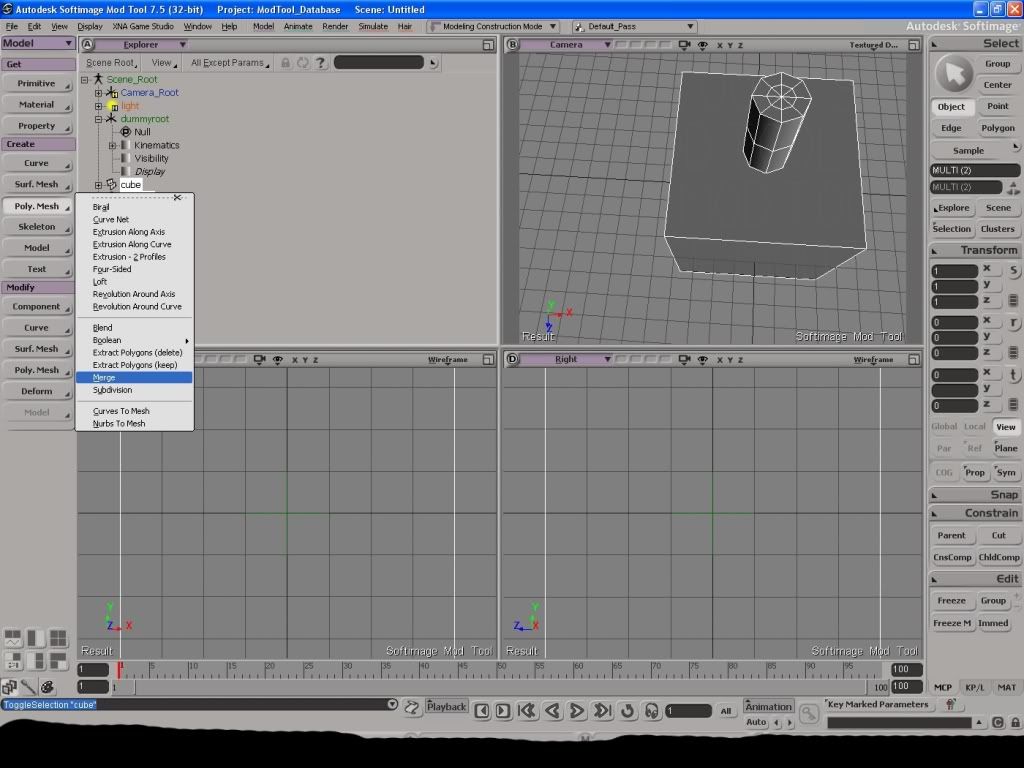
Pictures are easier sooo: (though this was done with 7.5 and not 6.0 so it may be different)
Re: Is there a way to copy the exact texturing to another mo
Posted: Sat Jan 01, 2011 2:56 am
by redgroupclan
Thank you. Though, after I did that, the two models were 'connected.' I couldn't delete the original model made out of individual parts without the merged model being deleted, too. I couldn't even move the original model without the merged model moving too. How do I solve this?
Re: Is there a way to copy the exact texturing to another mo
Posted: Sat Jan 01, 2011 9:47 am
by DarthD.U.C.K.
select the newly cerated mesh and click the "freeze m"-button (freeze modeling) on the lower right corner of the screen (under "edit")
alternatively you can click "delete" under "inputs" in the mergewindow, that will freeze the modeling and delete the original models.
Re: Is there a way to copy the exact texturing to another mo
Posted: Sat Jan 01, 2011 6:34 pm
by redgroupclan
Ah, there we go!
Thank you both for your help.