Page 31 of 55
Re: Post Your Desktop! II
Posted: Mon Apr 12, 2010 1:48 pm
by GangsterJawa
Hebes24 wrote:GangsterJawa wrote:Hebes24 wrote:GangsterJawa wrote:Hebes24 wrote:Windows Partition:
Alright, how do you do that?
What do you mean, exactly?
The dock is Stardock's ObjectDock, if that's what you mean:
http://www.stardock.com/products/objectdock
Yeah, that's what I meant. Thanks!
We need a sticky for the link to ObjectDock. I swear every time I post my Windows partition I have to repost that link. It's gotta be like 10 times I've posted that.
(no offense,
GangsterJawa.)
Haha, well last time you had Fences, and this isn't Fences, so I didn't know. Not your problem though. Although it's only the 2nd time you've posted as a response to me.

Re: Post Your Desktop! II
Posted: Mon Apr 12, 2010 7:12 pm
by Hebes24
GangsterJawa wrote:Hebes24 wrote:GangsterJawa wrote:Hebes24 wrote:GangsterJawa wrote:Hebes24 wrote:Windows Partition:
Alright, how do you do that?
What do you mean, exactly?
The dock is Stardock's ObjectDock, if that's what you mean:
http://www.stardock.com/products/objectdock
Yeah, that's what I meant. Thanks!
We need a sticky for the link to ObjectDock. I swear every time I post my Windows partition I have to repost that link. It's gotta be like 10 times I've posted that.
(no offense,
GangsterJawa.)
Haha, well last time you had Fences, and this isn't Fences, so I didn't know. Not your problem though. Although it's only the 2nd time you've posted as a response to me.
I never had fences....It was always ObjectDock.
Re: Post Your Desktop! II
Posted: Mon Apr 12, 2010 8:00 pm
by Dohnutt
Nova Hawk had Fences before, I think.
Re: Post Your Desktop! II
Posted: Mon Apr 12, 2010 8:06 pm
by RED51
Hey, where'ed you'ed get that cool JK icon?
Re: Post Your Desktop! II
Posted: Mon Apr 12, 2010 8:13 pm
by Hebes24
RED51 wrote:Hey, where'ed you'ed get that cool JK icon?
I don't remember. Either deviantART or Wincustomize. I always get my dock Icons from those sites.
Re: Post Your Desktop! II
Posted: Mon Apr 12, 2010 10:15 pm
by RogueKnight
Hebes24 wrote:RED51 wrote:Hey, where'ed you'ed get that cool JK icon?
I don't remember. Either deviantART or Wincustomize. I always get my dock Icons from those sites.
How do you change your icons? Whenever i go to my dock properties, it doesn't have the option to change icons.
Re: Post Your Desktop! II
Posted: Mon Apr 12, 2010 10:21 pm
by kinetosimpetus
Made this my background because it was simpler than opening an image file for reference while modeling/skinning.

Re: Post Your Desktop! II
Posted: Mon Apr 12, 2010 11:50 pm
by Hebes24
RogueKnight wrote:Hebes24 wrote:RED51 wrote:Hey, where'ed you'ed get that cool JK icon?
I don't remember. Either deviantART or Wincustomize. I always get my dock Icons from those sites.
How do you change your icons? Whenever i go to my dock properties, it doesn't have the option to change icons.
You have to click on the icon you want to change, and then go to "dock entry properties." (not just dock properties)
Re: Post Your Desktop! II
Posted: Mon Apr 19, 2010 10:41 pm
by jedikiller32
discovered Rainmeter and Fences, mainly thanks to whoever posted fences in this thread
http://jedikiller.mpcgamers.com/img/desktop-041810.png
Re: Post Your Desktop! II
Posted: Tue Apr 20, 2010 10:05 am
by Caleb1117
Still Alive!

Re: Post Your Desktop! II
Posted: Tue Apr 20, 2010 10:46 am
by Hebes24
Is that visual style for Windows 7? Where'd you get it? (and that wallpaper?)
Re: Post Your Desktop! II
Posted: Tue Apr 20, 2010 6:12 pm
by Caleb1117
Hebes24 wrote:Is that visual style for Windows 7? Where'd you get it? (and that wallpaper?)
It's a Windows Blinds skin tweak I'm working on. I wanna get my moneys worth after all. *Smacks self*
Anyway, I don't actually remember where I got the wallpaper, I could send it to you if you'd like.
Re: Post Your Desktop! II
Posted: Wed Apr 21, 2010 12:31 am
by Hebes24
Caleb1117 wrote:Hebes24 wrote:Is that visual style for Windows 7? Where'd you get it? (and that wallpaper?)
It's a Windows Blinds skin tweak I'm working on. I wanna get my moneys worth after all. *Smacks self*
Anyway, I don't actually remember where I got the wallpaper, I could send it to you if you'd like.
If you have it in 1440X900, please do.
Re: Post Your Desktop! II
Posted: Wed Apr 21, 2010 11:58 am
by 501st_commander
Caleb1117 wrote:Still Alive!
woah, that is epic.

How did you do that?
Edit:
mine:
If anyone is wondering why i have no icons...
http://www.phreakyourgeek.com/projects/ ... con-hider/
Re: Post Your Desktop! II
Posted: Wed Apr 21, 2010 4:17 pm
by Hebes24
Why can't you just right click on desktop -> view -> uncheck "show desktop icons"? That's what I do....
Re: Post Your Desktop! II
Posted: Wed Apr 21, 2010 5:56 pm
by 501st_commander
It makes it quicker, all i have to do i click a button on the taskbar.
Re: Post Your Desktop! II
Posted: Wed Apr 21, 2010 6:17 pm
by Nova Hawk
Latest Desktop:
Comments?
Re: Post Your Desktop! II
Posted: Wed Apr 21, 2010 7:14 pm
by GangsterJawa
Nova Hawk wrote:Latest Desktop:
Comments?
Yeah, I got one;
WANT!!!
Re: Post Your Desktop! II
Posted: Thu Apr 22, 2010 12:20 am
by Eggman
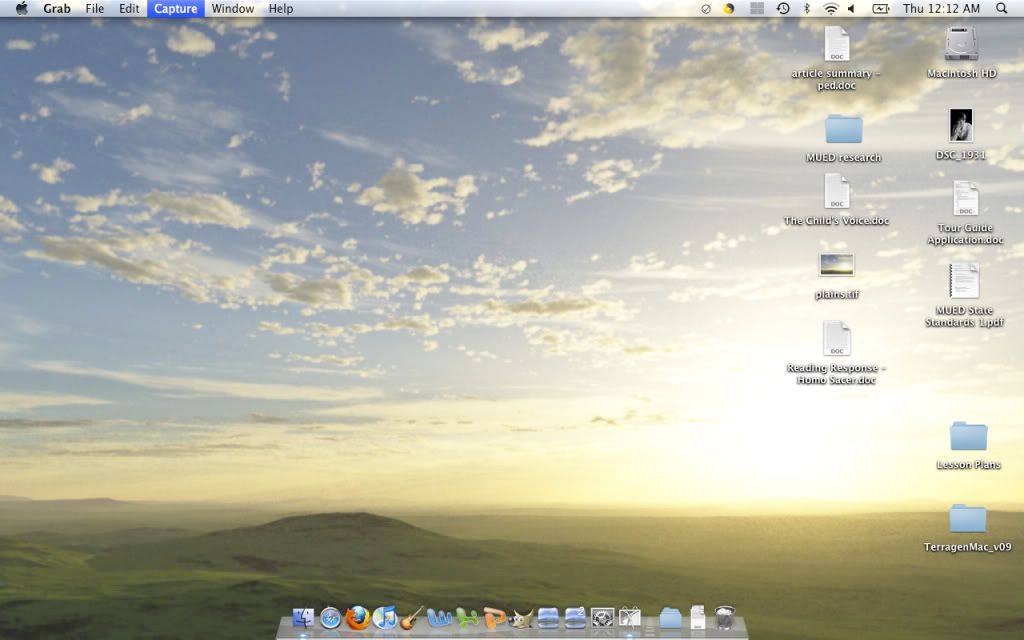
Self-created in Terragen. Not the best resolution, but I like it for now.
Re: Post Your Desktop! II
Posted: Thu Apr 22, 2010 7:53 am
by IndianaJoe
I like it, nice and simple

(we never change ours

it's really simple)