Changing the default sky in bf1?
Posted: Wed Apr 29, 2009 3:31 pm
I wondered if anyone knows if there is a tutorial for changing the default SKY_Geonosis. I'm hoping to change it for one of the bespin skies.
I have done a search but nothing came up.
Thanks for any help.
Edit: Thursday April 30, 2009 6:40 am
Please can an Admin or Mod lock this thread as I have now figured out how to do it.
I've written up a short tutorial for anyone who wants to change the default geonosis sky:
First thing you do is to edit your worlds .SKY file found in: (C:)/BFBuilder/Data(world name)/Worlds/(world name)/world1 folder.
Find the .SKY File eg: bes3 or whatever you have named it
open it in notepad
Now browse to the .SKY File you want to change it for; eg: bes1 found in (C:)/BFBuilder/Assets/Shipped Worlds/Bespin/world1 (or any world you want)
Open in notepad and copy everything starting from:
}
DomeInfo()
and paste in to your worlds .SKY file replacing all info starting from :
}
DomeInfo()
Now you have to copy all the sky assets relating to the .SKY file found in (C:)/BFBuilder/Assets/Shipped Worlds/Bespin/world1 (or any world you want)
and paste them in your world1 folder:
(C:)/BFBuilder/Data(world name)/Worlds/(world name)/World1
Make sure all previous sky assets from the default geonosis are removed from your world1 folder.
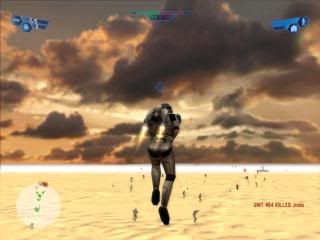
Clean, Munge and you should see your new sky in game.
Hope that helps anyone who has found this difficult.
Screen:
test map
I have done a search but nothing came up.
Thanks for any help.
Edit: Thursday April 30, 2009 6:40 am
Please can an Admin or Mod lock this thread as I have now figured out how to do it.
I've written up a short tutorial for anyone who wants to change the default geonosis sky:
First thing you do is to edit your worlds .SKY file found in: (C:)/BFBuilder/Data(world name)/Worlds/(world name)/world1 folder.
Find the .SKY File eg: bes3 or whatever you have named it
open it in notepad
Now browse to the .SKY File you want to change it for; eg: bes1 found in (C:)/BFBuilder/Assets/Shipped Worlds/Bespin/world1 (or any world you want)
Open in notepad and copy everything starting from:
}
DomeInfo()
and paste in to your worlds .SKY file replacing all info starting from :
}
DomeInfo()
Now you have to copy all the sky assets relating to the .SKY file found in (C:)/BFBuilder/Assets/Shipped Worlds/Bespin/world1 (or any world you want)
and paste them in your world1 folder:
(C:)/BFBuilder/Data(world name)/Worlds/(world name)/World1
Make sure all previous sky assets from the default geonosis are removed from your world1 folder.
Clean, Munge and you should see your new sky in game.
Hope that helps anyone who has found this difficult.
Screen:
test map