Page 1 of 1
MshEx export problem?
Posted: Wed May 04, 2011 11:18 pm
by Cerfon Rournes
I made my model, added textures, merged meshes, froze transforms, and exported using crosswalk.
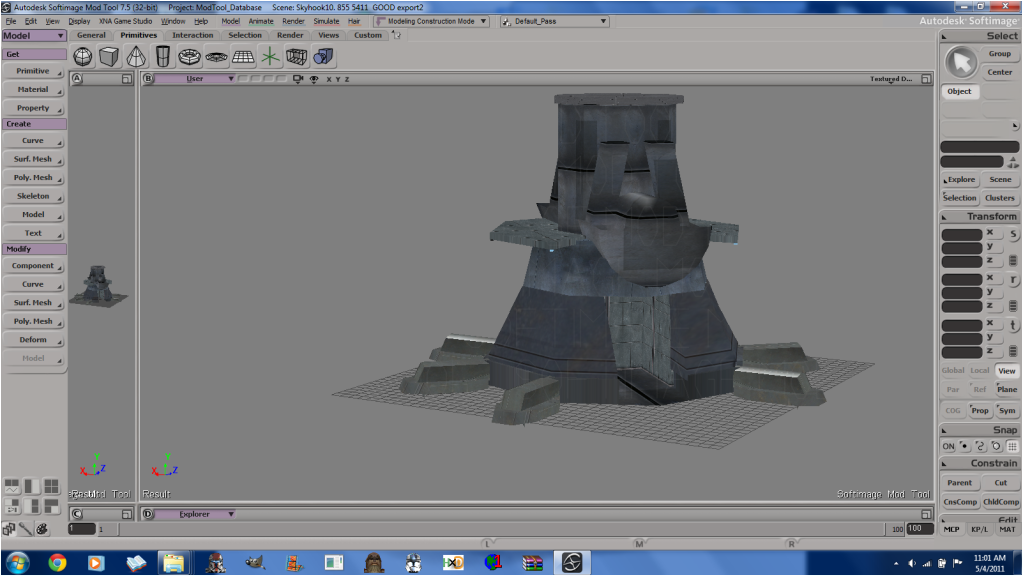
In XSI, the model looks like this.
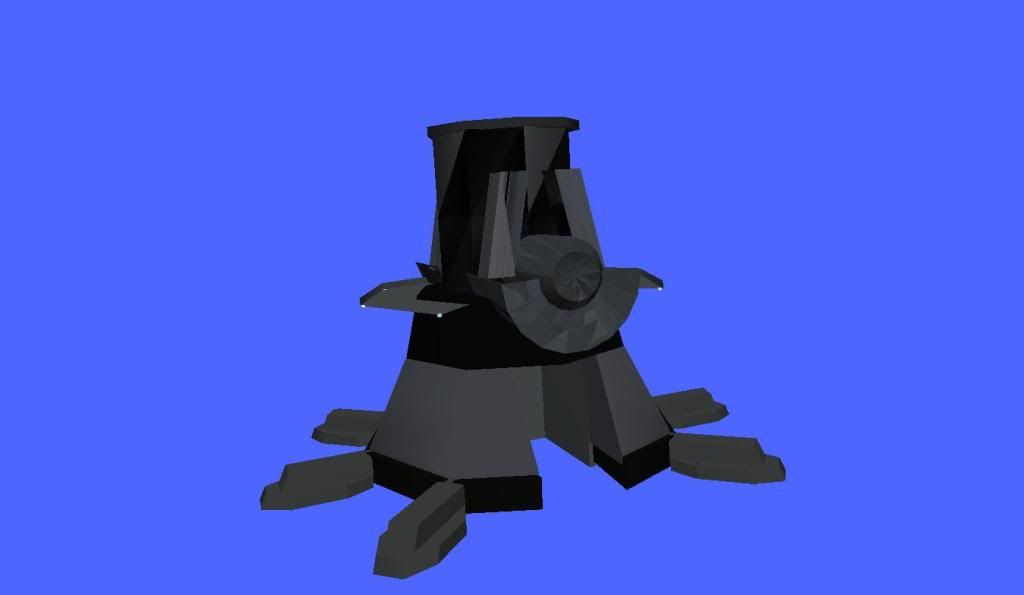
Right after the XSI export, I exported it to msh using MshEx. After that export, the model looks like this in SWBF viewer.
What am i missing?
The model is 3073 triangles.
Thanks for your help guys.
Re: MshEx export problem?
Posted: Thu May 05, 2011 11:00 am
by agentsmith38
A few things i've learned myself to make MshEx to work properly -
You must not delete any of the edges or points on the model.
Not sure about this one but - You cannot apply another texture on the model when it already has a texture.
These may all be wrong, but when I follow these rules, MshEx exports all my models without any mess-ups. And when I break one of those rules, it always messes up.
One thing i can suggest for you to do is to give that model in obj format and ask someone who has XSI Foundation to export it.
Re: MshEx export problem?
Posted: Thu May 05, 2011 12:34 pm
by kinetosimpetus
Make sure there is only one texture projection for each polymesh. The mesh can have subprojections, but not mulitple top level projections.
When adding a second image to a msh, select the polies that need the second texture and add the image, but dont select a new projection from the add image screens, use the UV layout screen to add a subprojection.
agentsmith38 wrote:
You must not delete any of the edges or points on the model.
I delete and add points and edges all the time and mshex works fine.
Re: MshEx export problem?
Posted: Thu May 05, 2011 4:20 pm
by Cerfon Rournes
Hmm. I think it is the texture problem. I'll load an old save and come back with results. Thanks for the help so far guys.
EDIT
Wow, i just found out that one of the meshs has 32 Texture_Supports!


Re: MshEx export problem?
Posted: Thu May 05, 2011 5:38 pm
by kinetosimpetus
That would do it.
Re: MshEx export problem?
Posted: Thu May 05, 2011 11:08 pm
by Cerfon Rournes
Hmm, I fixed the Texture_Supports, but it still looks strange. Anyone want to export it for me/ tell me what i'm doing wrong?
Re: MshEx export problem?
Posted: Fri May 06, 2011 6:38 pm
by The Nasal Abyss
If you are modeling in an external program (one other then XSI) it may make UV's automatically. If your are texturing in XSI exclusively, then stop XSI from importing the UV's when you go to import the model into XSI.
EDIT: Also, you never mentioned freezing the UV's. Make sure you do that.
Re: MshEx export problem?
Posted: Fri May 06, 2011 6:42 pm
by Cerfon Rournes
How do you freeze the UVs? Do you mean Freeze transforms? Because i did that..
Re: MshEx export problem?
Posted: Fri May 06, 2011 8:48 pm
by AceMastermind
Freezing the transforms and freezing the construction history are two different things. I think this is where a lot of folks mess up when preparing their scene for the msh format, you need to do both. Read the animation_guide.doc for more information, the information under the first section titled Mesh applies to all objects(except primitives) exported to msh.
Re: MshEx export problem?
Posted: Fri May 06, 2011 8:54 pm
by Cerfon Rournes
Thanks Ace, I'll look into that now.

EDIT
It says this..
Freeze the geometry, (collapse stack, delete construction history, whatever you like to call it).
How is this done?
Re: MshEx export problem?
Posted: Sat May 07, 2011 11:25 am
by DarthD.U.C.K.
click the "freeze m" button. in the lower right corner of the srceen.
Re: MshEx export problem?
Posted: Sat May 07, 2011 12:15 pm
by Cerfon Rournes
Umm..not there.
Re: MshEx export problem?
Posted: Sat May 07, 2011 3:42 pm
by AceMastermind
Cerfon Rournes wrote:...
It says this..
Freeze the geometry, (collapse stack, delete construction history, whatever you like to call it).
How is this done?
The
animation_guide.doc gave you keywords, you can search for these keywords in the XSI documentation, if you have XSI open just press F1 which is the shortcut key to the help guides. You can also search the
online XSI documentation, there is a link to it in the
XSI FAQ sticky.
Freezing the operator stack
This information posted on Valve Dev Community sums it up well and also applies to SWBF2:
[color=#FFBF40]XSI Beginner Tutorial[/color] wrote:Finishing Things: Freezing the Operator Stack
In XSI you edit (operate on) a kind of 'editable preview' of your model rather than the actual model itself. XSI records these operations in stacks. When you Freeze the operator stack you effectively apply or save the changes to your model. This means you can no longer undo those operations.
Use Freeze All Transforms & Freeze (or Freeze M):
- Before applying bones.
- Before exporting.
- If XSI is getting slow.
Freeze All Transforms: In order to export your model properly, you must use the Freeze All Transforms (translations, scalings, and rotations) function, which is buried in the context menu triggered by L-clicking the head (title) of the "Transform" panel.
Freeze M: clears the modeling stack, including any weight maps and texture projections that were applied in the modeling region. The Freeze M button lives in the "Edit" panel at the foot of the right hand sidebar. When your model is enveloped, Freeze will also clear weight map, so use Freeze M (Freeze Model changes) instead.
Freeze: (aka 'Freeze entire object') clears the entire construction history, including the modeling stack as well as any texture operator stacks and weight painting stacks. The Freeze button lives in the "Edit" panel at the foot of the right hand sidebar. Freezing removes any animation on the modeling operators (for example, the angle of a Twist deformation, and so on). The values at the current frame are used.
- Note: If running XSI with lower than recommended vertical screen resolution, the "Edit" panel can be pushed off-screen by default! To find it, R-click on the head (title) of the "Transform" and/or "Select" panel to minimize them, and the "Edit" panel should become visible
Remember you are never more than a few clicks away from the information you need.
Re: MshEx export problem?
Posted: Sat May 07, 2011 4:02 pm
by The Nasal Abyss
You can also freeze by going into the UV texture editor (alt-7) and going to Edit>Freeze, if I remember correctly. Do this separate from freezing the transforms.
Re: MshEx export problem?
Posted: Sat May 07, 2011 4:18 pm
by AceMastermind
The Nasal Abyss wrote:You can also freeze by going into the UV texture editor (alt-7) and going to Edit>Freeze...
This only freezes the texture projections, you still need to freeze the object's construction history which will also freeze the texture projections; you kill 2 birds with 1 stone this way, just use
Freeze M prior to export to avoid missing anything and you'll be fine.
Re: MshEx export problem?
Posted: Sat May 07, 2011 5:02 pm
by Cerfon Rournes
I did everything that you guys said, but It's still coming out the same...Anyone want to export it for me?