Page 2 of 5
Re: BF2 ZE Terrain Tool
Posted: Tue Dec 11, 2012 10:35 pm
by Marth8880
Maveritchell wrote:Marth8880 wrote:Heh, you should use Slider, the Mass Effect font.

If you want I'll provide a link once I find it.

No. Terrible idea. Using some crappy fancy font is a great way to ruin a tool. Stick with something sans-serif and common and boring - it's a tool, not a piece of art.
What? I don't even... Slider's hardly "fancy" or even crappy for that matter, and it's a heck of a lot better than using a serif font. To be honest, Arial would probably be best though. I just like Slider.

Fiodis wrote:It always annoyed me how ZeroEditor's lowercase and uppercase letters looked practically the same.
Heh, I know, right?!?

Re: BF2 ZE Terrain Tool
Posted: Tue Dec 11, 2012 10:43 pm
by Cleb
Maybe there should be a font-customizer thing.

Re: BF2 ZE Terrain Tool
Posted: Tue Dec 11, 2012 11:13 pm
by Fiodis
Eh. Fonts aren't high on my things-I-should-get-done list.
Toying a bit more with the buttons, more getting a feel for how Qt's Stylesheets work than anything else.
Re: BF2 ZE Terrain Tool
Posted: Wed Dec 12, 2012 1:18 am
by Noobasaurus
A gradient with a dark color in the middle where the text is makes the text harder to read.
Just what I'm thinking.
Re: BF2 ZE Terrain Tool
Posted: Wed Dec 12, 2012 2:05 am
by Marth8880
Jes, exactly what Boobasaurus said. A dark background underneath bright text or vice versa will work well. Remember: text should always be white (or a bright shade of grey) or black.
Re: BF2 ZE Terrain Tool
Posted: Wed Dec 12, 2012 2:13 am
by yuke5
Marth8880 wrote:Jes, exactly what Boobasaurus said.

But in all seriousness, I agree with Marth and Noobasaurus.
Re: BF2 ZE Terrain Tool
Posted: Wed Dec 12, 2012 2:14 am
by Marth8880
Hmm? What did I do?
Re: BF2 ZE Terrain Tool
Posted: Wed Dec 12, 2012 8:15 am
by ANDEWEGET
No Slider.

Arial is great.
If any colors I'd go for black/dark gray + Zero-Orange like ZE.
Re: BF2 ZE Terrain Tool
Posted: Wed Dec 12, 2012 12:21 pm
by Noobasaurus
Marth8880 wrote:Jes, exactly what Boobasaurus said.
What is this madness!?
Re: BF2 ZE Terrain Tool
Posted: Wed Dec 12, 2012 3:07 pm
by Fiodis
Yeah, I do actually like ZE's orange-and-grey.
Better?
Re: BF2 ZE Terrain Tool
Posted: Wed Dec 12, 2012 3:49 pm
by ANDEWEGET
Way better.
The GroupBox borders could be orange, too. And I'd make the buttons/combo boxes squarey in a dark gray with an orange roll over or something.
Re: BF2 ZE Terrain Tool
Posted: Wed Dec 12, 2012 5:14 pm
by GAB
I agree with ANDE. Either way, I think you're doing a nice work Fiodis.


Re: BF2 ZE Terrain Tool
Posted: Mon Dec 17, 2012 10:08 pm
by Fiodis
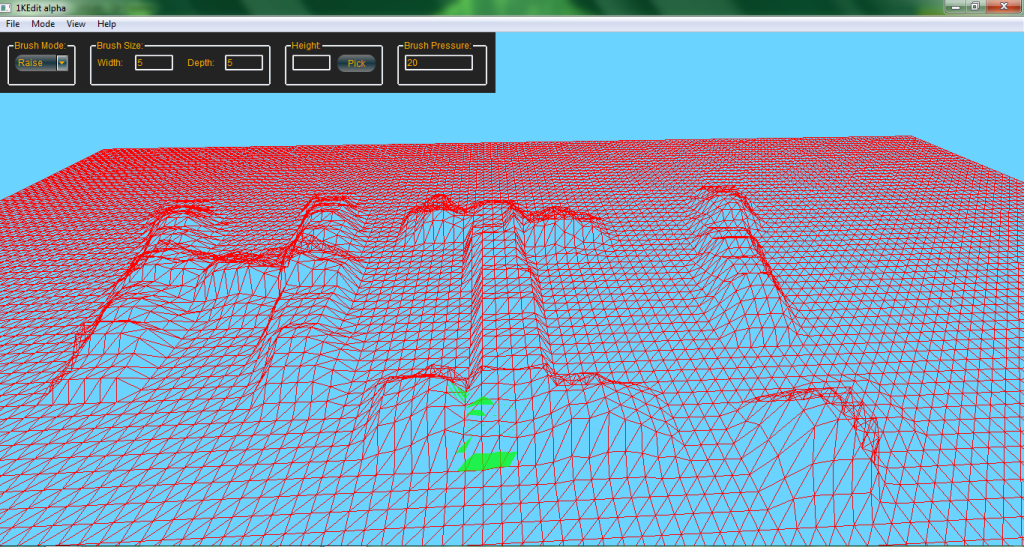
And after another five days of coding instead of studying for final exams, terrain height brushes are working. This is a terrain I imported perfectly flat, then messed around with:
Clipping through the terrain a bit, it can do that at a distance. I'll have to raise it a bit. It's also pretty sensitive. I might tweak down the master sensitivity, but for now you can adjust it with pressure, just like in ZE. With ZeroEdit you can have pressures from 1 to 100, IIRC, but usually (at least for me) most work was done with it in the 10-40 range. In this tool (have yet to decide on a name) you can set a pressure from 0 to whatever, but at the current sensitivity generally you'd want to stay below 30.
Actually you can set negative pressures, and then left-clicking will lower while right-clicking will raise. Heh, I hadn't anticipated that behavior.
Next on the agenda is getting more brush features functional - right now it's locked in the shape of a 5x5 square, and only the raise/lower mode is enabled. Painting (setting all vertices to a single height) ought to be easy, it's blending I need to spend some time thinking about. Resizing should work fine with the present code, actually; I just haven't rigorously tested it. I suspect some bug will show up that I'll have to fix.
Ande, if I catch you on XFire, could you explain how to recolor the group box borders? I can't seem to find that online; the border-color setting doesn't seem to change anything.

Re: BF2 ZE Terrain Tool
Posted: Mon Dec 17, 2012 10:33 pm
by THEWULFMAN
Looking good Fiodis. Keep being awesome.
Re: BF2 ZE Terrain Tool
Posted: Tue Dec 18, 2012 12:33 am
by Fiodis
Yep; paint mode working now, too.
Re: BF2 ZE Terrain Tool
Posted: Wed Dec 19, 2012 2:36 pm
by DarthD.U.C.K.
wow, that is awesome and motivating !
how is everybody becoming a programming genius? can i get some of that stuff too please?
Re: BF2 ZE Terrain Tool
Posted: Thu Dec 20, 2012 5:51 pm
by LEO
can you make it possible to place water in diffrent heights? or is that impossible?
Re: BF2 ZE Terrain Tool
Posted: Thu Dec 20, 2012 6:24 pm
by Dreadnot9
LEO wrote:can you make it possible to place water in diffrent heights? or is that impossible?
Impossible.
EDIT: After being so blunt I can only imagine that I must, in some way, be wrong.
Re: BF2 ZE Terrain Tool
Posted: Thu Dec 20, 2012 7:21 pm
by Maveritchell
Dreadnot9 wrote:LEO wrote:can you make it possible to place water in diffrent heights? or is that impossible?
Impossible.
EDIT: After being so blunt I can only imagine that I must, in some way, be wrong.
This is just a GUI for creating/editing .wld (and associated) files. There's nothing here that you couldn't do with a text editor, outside of generating the terrain (which isn't human-readable). While it's a neat-looking tool, it doesn't change the game or its limitations.
Re: BF2 ZE Terrain Tool
Posted: Thu Dec 20, 2012 8:54 pm
by Marth8880
A request: the ability to change the density, or subdivision level, if you will, of the terrain, which I'm almost positive must be possible since space terrain is lower-res than normal terrain.