
Object shadows.
Moderator: Moderators
-
Galaxy15
- Private Recruit
- Posts: 16
- Joined: Tue Dec 28, 2010 7:34 am
- Projects :: No Mod project currently.
Object shadows.
I have a direction light in my map, but its not casting any object shadows. Player shadows and terrain shadows work fine but I really want some object shadows. How can I achieve this?
-
commander501stappo
- Jedi

- Posts: 1016
- Joined: Tue Sep 28, 2010 8:13 am
- xbox live or psn: DarthAppo
- Location: In a galaxy very, very close by...
Re: Object shadows.
here's a link to a tutorial on "how to add shadows"
-
Galaxy15
- Private Recruit
- Posts: 16
- Joined: Tue Dec 28, 2010 7:34 am
- Projects :: No Mod project currently.
Re: Object shadows.
That's what I've done but I don't get object shadows. 
-
Jendo7

- Sith

- Posts: 1304
- Joined: Wed Apr 01, 2009 6:37 pm
- Location: Cambridge, England.
- Contact:
Re: Object shadows.
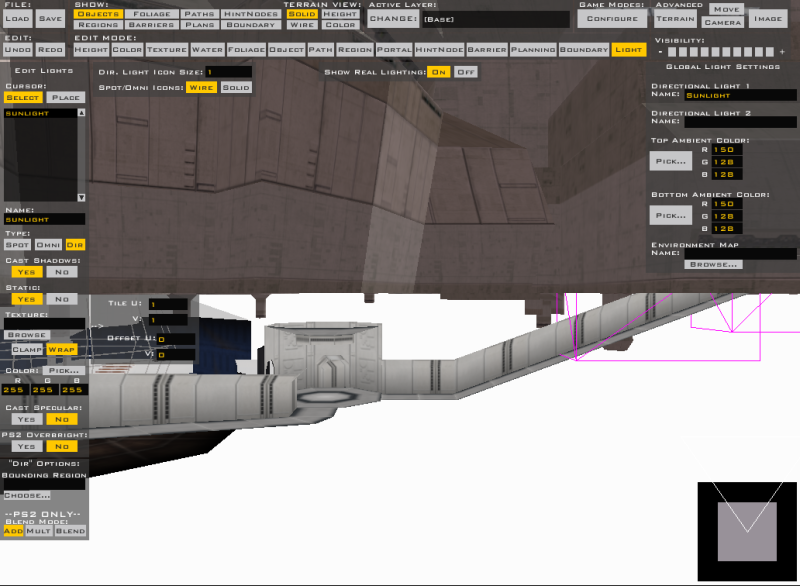
Do you have these options selected:
You might also need to move the directional light in ze, so it's pointing at an angle towards the ground.
Hidden/Spoiler:
-
DarthD.U.C.K.

- Master of the Force

- Posts: 6027
- Joined: Wed Sep 27, 2006 11:05 am
- Location: Duckburg, Germany
Re: Object shadows.
what kind of objects are you using? some objects dont have a shadowvolume included in the msh and therefore cause no shadows ingame, if thats the case, make a "objectname.msh.option" file for all ojects without shadow and write "-highresshadow" in it.
-
Galaxy15
- Private Recruit
- Posts: 16
- Joined: Tue Dec 28, 2010 7:34 am
- Projects :: No Mod project currently.
Re: Object shadows.
@ Jendo7 - They are the exact options I am using and the light is facing down towards my map. Its not totaly over head. It has an angle but still no shadow.
@ DarthDuck - I am using the felucian assets. I dont think they have a shadow volume, so I will try what you suggested.
Thanks for your help everyone.
EDIT: I tried but no good. This is exactly what I had in my .option file, and the name of my file was fel1_bldg_whisker_clump01.msh.option.
Anymore help?
EDIT: I still need help.
@ DarthDuck - I am using the felucian assets. I dont think they have a shadow volume, so I will try what you suggested.
Thanks for your help everyone.
EDIT: I tried but no good.
This is exactly what I had in my .option file, and the name of my file was fel1_bldg_whisker_clump01.msh.option.Hidden/Spoiler:
EDIT: I still need help.
-
Marth8880
- Resistance Leader
- Posts: 5042
- Joined: Tue Feb 09, 2010 8:43 pm
- Projects :: DI2 + Psychosis
- xbox live or psn: Marth8880
- Location: Edinburgh, UK
- Contact:
Re: Object shadows.
Do you have shadows enabled in the game's video settings?
-
CressAlbane
- Master Bounty Hunter

- Posts: 1519
- Joined: Fri Dec 18, 2009 8:02 am
- Projects :: CTF Arenas
- Location: ¿uoıʇɐɔoן ʎɯ sıɥʇ sı
Re: Object shadows.
He said that playershadows were working fine, so I assume that isn't the problem.
-
Galaxy15
- Private Recruit
- Posts: 16
- Joined: Tue Dec 28, 2010 7:34 am
- Projects :: No Mod project currently.
Re: Object shadows.
All shadows bar the object ones work fine. I added the line into an msh.option file and I've still got nothing. 
-
asleeponduty

- Private First Class
- Posts: 77
- Joined: Tue Jul 22, 2008 3:05 pm
- xbox live or psn: No gamertag set
- Location: Illinois
Re: Object shadows.
Try this:
Load your map in ZE, and click build accurate object collision. then go to Image, check Burn object Shadows, make sure your ligh casts shadows, and click Burn Terrain.
It works for me, should work for you
Load your map in ZE, and click build accurate object collision. then go to Image, check Burn object Shadows, make sure your ligh casts shadows, and click Burn Terrain.
It works for me, should work for you