Page 1 of 1
Zero Editor w/ New Problem!
Posted: Tue Nov 14, 2006 9:50 pm
by Darth_Z13
I'm in a real pickle.

(He he even though I hate pickles)
Anyways...
Zero Editor is lagging majorly and I mean it! Where it should take me 10 seconds to load a level it's taking about a minute. When editing it's so slow I can't even move. The rest of my computer is working fine so I re-installed the Mod Tools. That cleared up my problem for two days but then it started again. Any ideas?

New Problem:
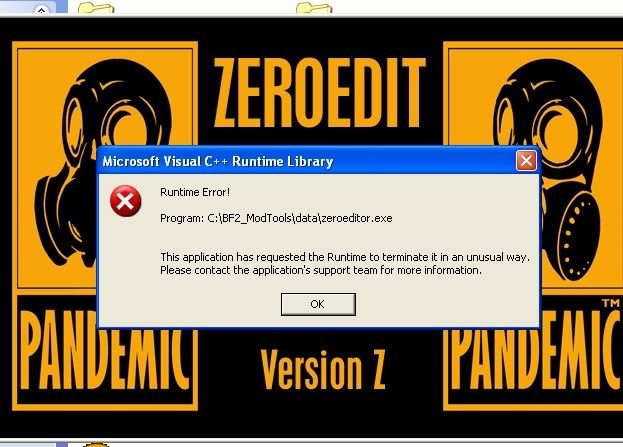
Zero Editor won't start. I get this error.
RE: Zero Editor
Posted: Tue Nov 14, 2006 11:32 pm
by [RDH]Zerted
Try not using 'real collision' or whatever its called when you load up your map.
RE: Zero Editor
Posted: Wed Nov 15, 2006 12:07 am
by Ace_Azzameen_5
Before you load, go to the light tab and disable real lighting.
RE: Zero Editor
Posted: Thu Nov 16, 2006 5:43 pm
by Darth_Z13
I never use the collision thing and the real lighting didn't help. Anything else?
RE: Zero Editor
Posted: Thu Nov 16, 2006 5:46 pm
by Ipodzanyman
Are you running any other programs in the background, sometimes ZE gives me crap when I use Itunes at the same time....hope that helps

RE: Zero Editor
Posted: Fri Nov 17, 2006 8:41 am
by Darth_Z13
Thanks Ipodzanyman, but I only had Windows Live Messenger running and that didn't help closing it.
RE: Zero Editor
Posted: Fri Nov 17, 2006 6:10 pm
by Ipodzanyman
how much RAM do you have, actually post all your specs please.....
RE: Zero Editor
Posted: Fri Nov 17, 2006 6:31 pm
by Darth_Z13
There copied right from my Xfire profile!

Processor:
Intel Pentium 4 CPU 2.80GHz
Memory:
1024MB RAM
Hard Drive:
250 GB
Video Card:
Radeon X1300 Series
Monitor:
LCD
Sound Card:
Realtek AC97 Audio
Speakers/Headphones:
Dunno what kind.
Keyboard:
A Keyboard
Mouse:
A Mouse
Mouse Surface:
A Wicked Mousepad
Operating System:
Windows XP Home Edition Service Pack 2
Posted: Fri Nov 17, 2006 6:35 pm
by Vyse
Have you tried restarting your computer. Sometimes ZE might think it's running in the background or something.
Posted: Fri Nov 17, 2006 6:51 pm
by Darth_Z13
Vyse you rock!
Posted: Fri Nov 17, 2006 7:01 pm
by Ipodzanyman
Did that work? 0_o
Posted: Sat Nov 18, 2006 1:10 am
by Darth_Z13
Ya fixed it!

Posted: Sat Nov 18, 2006 1:57 am
by JabbaLovesLava
Ok, Number 1 lesson about windows:
When something isn't working, try restarting your computer. It fixes problems .. i dont know, maybe like 35-ish% of the time.
Posted: Sun Nov 19, 2006 11:05 pm
by Adreniline
Do you usually leave your computer running or on standby? In most newer machines standby is a type of "off state" and is much better for the health of the computer.
It's what I use
Posted: Wed Dec 06, 2006 10:54 pm
by Darth_Z13
Bump New Problem in First Post!