Page 1 of 1
!Zero Editor Error - Not Runtime!
Posted: Sat Mar 22, 2014 8:20 pm
by Corogl
Hello everyone! I am having an issue with Zero Editor although believe it or not, it is NOT with the Runtime Package error!
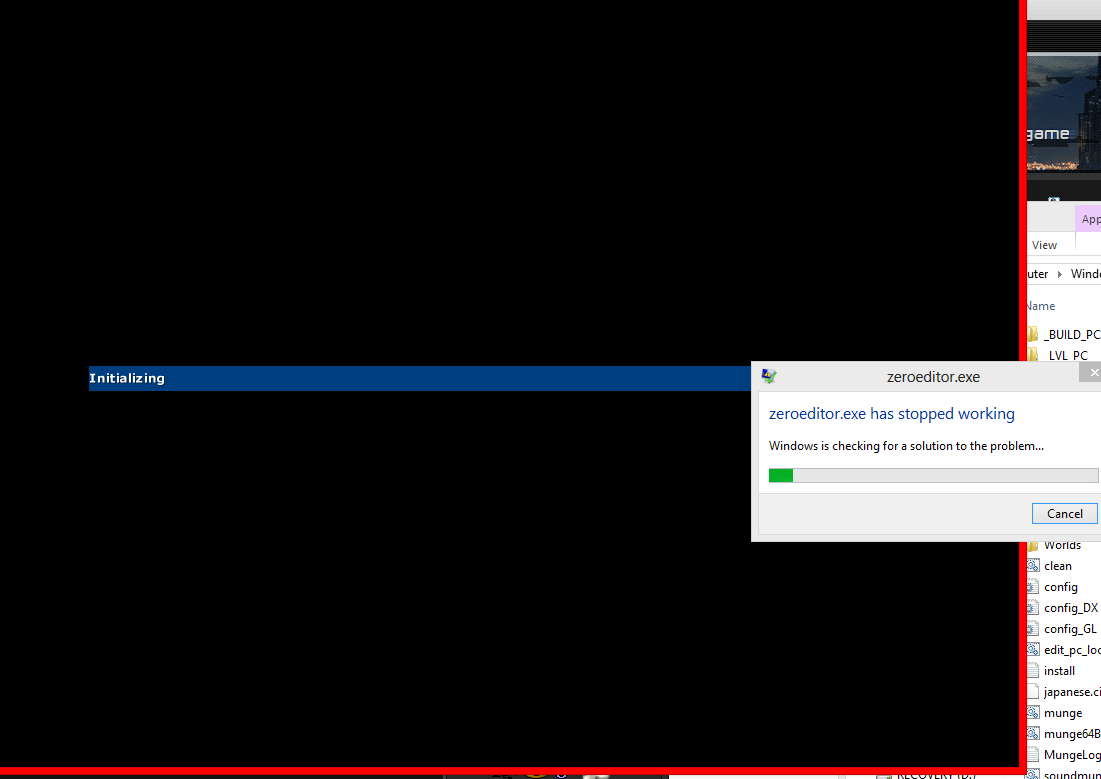
I recently solved that issue, although an entirely new issue now occurs (image below)
It seems that the issue occurs INSTANTLY after the main ZE window opens.
I am running a Windows 8, 64-Bit Laptop with Intel(R) HD Graphics 4600 as my graphics card
I can not seem to find any webpage to update the drivers necessary for this card, although I assume they are up to date as the laptop is fairly new.
If anyone has had this issue before, I would certainly like to know who and if you have been able to fix it.
Thank you to all in advance,
Corogl
Re: !Zero Editor Error - Not Runtime!
Posted: Sun Mar 23, 2014 2:00 am
by Noobasaurus
Let's start off with the basics:
Have you tried running it as admin?
Have you tried running it using
3DAnalyze with emulate HW TnL Caps checked?
Re: !Zero Editor Error - Not Runtime!
Posted: Sun Mar 23, 2014 11:31 am
by Corogl
I have tried running it with admin privileges, and this has not had any effect.
I have also tried running it in compatibility mode as well as with 3D Analyze.
The problem with using 3D Analyze or Compatibility Mode is, after setting any options, it gives me the Runtime Error again, as seen below:
Do you have any idea as to what could be happening?
Re: !Zero Editor Error - Not Runtime!
Posted: Sun Mar 23, 2014 5:09 pm
by Noobasaurus
Hm. How many times did you try using 3DAnalyze? Often times it works on the second try and on. If you only tried it once, please try it again.
Now if you've already tried that multiple times, have you tried changing your display color quality settings to highest 32 bit?
Re: !Zero Editor Error - Not Runtime!
Posted: Sun Mar 23, 2014 7:54 pm
by Corogl
I've tried using 3D Analyze many times, and as mentioned before, it gives me the runtime error each time.
Also, I am running Windows 8. How do I change the color quality settings? When I right-click (ZeroEditor.exe) and go to properties, compatibility, there is a reduced color mode, but it only has 8-bit and 16-bit.
Re: !Zero Editor Error - Not Runtime!
Posted: Sun Mar 23, 2014 8:29 pm
by Noobasaurus
Re: !Zero Editor Error - Not Runtime!
Posted: Sun Mar 23, 2014 9:17 pm
by AceMastermind
Corogl wrote:Also, I am running Windows 8. How do I change the color quality settings?...
http://www.gametoast.com/viewtopic.php?p=501991#p501991

Re: !Zero Editor Error - Not Runtime!
Posted: Sun Mar 23, 2014 10:14 pm
by Corogl
Thanks for the links, I tried it but the color settings were already on the highest (assuming it is the max resolution + 60 Hertz). Do you guys have any other possible solutions? Maybe trying it in a different mode will work?