Page 1 of 1
Artifacts?
Posted: Tue Jan 30, 2007 8:30 pm
by PvtParts
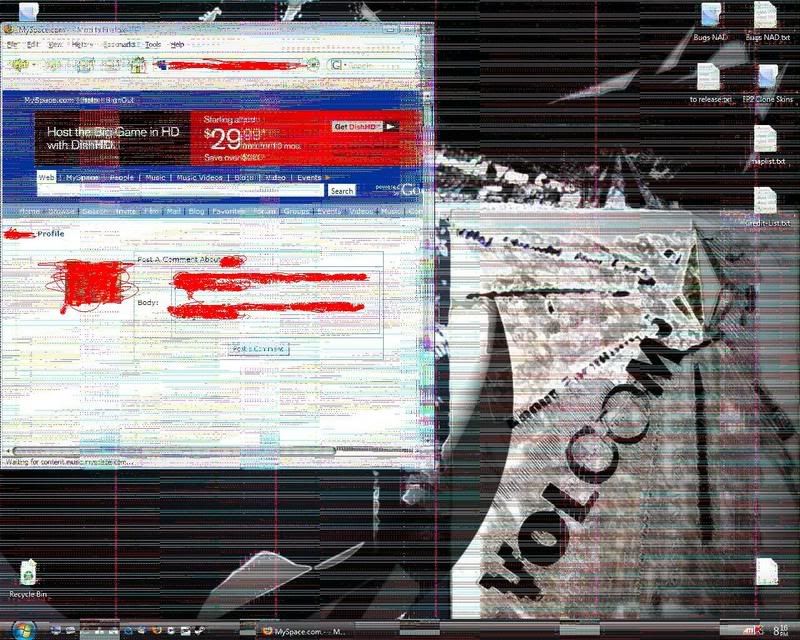
Okay, so I'm having some issues with artifacts (
http://i65.photobucket.com/albums/h229/ ... 1170203760 - note red 'pen' is to cross out myspace stuff in browser)
Now, I've done a lot of research all around the internet, and the most frequent (only.) causes I saw where
basically heat, video card, monitor (though it was crt, i have lcd), motherboard (cpu/chipset issues) and just dieing hardware.
I've interchanged video cards (Radeon 9800 Pro (mine) with Radeon 9600). My 9800 Pro played fine on my bros computer (I didn't put his in mine). I did some basic graphic stuff, then played a few "graphically intense" games, such as kotor, starfighter, half-life 2/css etc. It worked fine.
I also looked into heat/poor air circulation, and neither of them are an issue in my system. To be sure I also interchanged my Princeton Senergy 714 monitor with my brothers, I forget what it is but its comparable (a little better quality wise) and the same size (also an lcd display.)
So, now I fear its my motherboard. Not only does my desktop look aweful, I can't do anything that requires and use of the GPU, or I get a screen covered thick in this stuff, among other things (triangles originating center screen and pulling outward..)
Heres my setup:
OS: Windows XP Professional SP 2
Motherboard: Intel 865PE Neo2 S/ LS/ FIS2R (MS-6728)
-Bios v 1.00
Processor: Intel Pentium 4 CPU 2.40GHz
Graphics Card: Radeon 9800 Pro (AGP)
Memory: 512MB
Direct X: 9.0c
If you need any more info lemme know, I really dont want to have to replace my motherboard..
RE: Artifacts?
Posted: Tue Jan 30, 2007 9:51 pm
by ShadowHawk
were/are you overclocking the cpu or graphics card? If you were overclocking the old card and put in this new one, some risidual setting scan be screwing it up. If you are overclocking the cpu and/or card now. The same thing. Also drivers could be messed up and such. Best to try the latest and greatest to see if it solves the prob first.
RE: Artifacts?
Posted: Tue Jan 30, 2007 9:58 pm
by TheTao
Looks like a monitor issue to me. My laptop did that for a while before the monitor completely busted.
Posted: Tue Jan 30, 2007 10:05 pm
by PvtParts
EDIT: TheTao, yeah I checked the monitor thing out and switched comparable lcds with my brother, didn't change anything.
I wasn't overclocking anything at the time (as far as I know. I mean my dad was saying we outta get my cpu up to 2.80GHz if not 3.00GHz but thats not happening now).
Video wise I dont think so either.
I have tried a number of things driver wise.
I updated my bios (though the updates were nothing serious and it was unneeded, I was more or less just hoping for a break). Also updated all system/hardware drivers.
At the time I was running the second newest catalyst driver (hadn't heard about new one). I tried updating, and also rolling back a few drivers.
We found that the North Bridge (NB) fan on my chipset had stopped (this was back when the issue first started), we replaced it, and still no luck.
Of course heat damage is a possibility, but the thing is is my computer is cool, and with the heatsink on we could tell that that wasn't the case (it was nice and cool). I now have a cheap 40mm case fan on it, not meant for chipset but its better than nothing I'd think.
I'm going to try taking the heatsink and fan off the chipset altogether - my dad suggested that perhaps when the NB fan went out, the temp sorta 'broke the camels back', and pressure from the heatsink is now keeping the chipset in bad shape.
I'm 99 percent sure its a hardware issue at this point, but theres a chance and before I go buying a new motherboard I'd like to get some input.
We considered it was perhaps software corruption, but I'm sure its not since I reinstalled windows (unrelated to the artifacts just had some issues with the old installation, which still resides on my computer since I didn't want to wipe my hard drive and want to make sure I get all my emails and such on the new one).
Posted: Wed Jan 31, 2007 7:05 am
by Penguin
Are you holding or have a mobile phone under or near by your moniter? the singals from from a phone can make your moniters screen go off like that, go all wavy, or start flashing
Posted: Wed Jan 31, 2007 7:25 am
by PvtParts
Well I sorta do...but its long since dead. I took it surfing (ahhh!!!) and it fried and all the innards are corroded. I dont have any static electricity/magnets or such around my computer or monitor. Just speakers, jones soda bottles, candy trash, a black light, and a couple a cds.
Posted: Wed Jan 31, 2007 7:28 am
by Penguin
Have you tried the computer without the cover for a test run to see if the new fan runs alright?
Also have you tried cleaning any dust out? off the cover of the moniter ((and the back)) and the towers cover and inside?
Posted: Wed Jan 31, 2007 1:43 pm
by PvtParts
If by cover you mean like case cover, then yeah I took it off and ran everything. The access side is a brushed metal cutout with plexiglass, so I can see into it very clearly. There is a fan in the center of this side peice, sucking cool air in.
But yeah the fan I have on their works fine, though like I said before its not really fast enough (low rpm), as its not meant for chipset cooling.
I totally cleaned out everything, vacuumed all the dust out, and used the cotton tipped sticks (their name is on the tip of my tongue but I forget, little paper sticks with tiny cotton balls on either end) to get the small spots.
I also took off the fan and heatsink and applied some silver paste as opposed to the low quality stuff I had on (it was kinda gluey and rubbery in texture I forget what it was).
So yeah I thoroughly got all the dust off of everything, and even took out the video card and cleaned it even more thoroughly, so I'm pretty sure its not that.
Posted: Thu Feb 01, 2007 4:22 pm
by ShadowHawk
The northbridge chip on the MB could be the prob then. Coulda gotten overheated when the fan went out and some of the transistors fried. The Northbridge is a chipset that communicates with the computer processor and controls interaction with memory, the PCI bus, Level 2 cache, and all AGP activities, so it could cause gfx probs by screwing up the communication.
Posted: Sat Feb 03, 2007 2:33 pm
by Redneck-Alcatraz
i had simminlar problems last summer
check out the following:
1. motherboard could be failing (if so back up EVERYTHING NOW!)
2. Graphics card could be dieing
3. Hard drive could be failing (if so back up EVERYTHING NOW!)
4. Bad wiring (disconect then reconect, or just replace)
5. bad plugs for the wires
6. corrotion
Posted: Tue Feb 06, 2007 9:14 pm
by PvtParts
Sorry I've been out, I reformated my hard drive and have been busy setting up windows and moving back all my backed up stuff (my mod files were around 15 gig alone! whew)
After taking the heatsink and fan off, my monitor went wild (I couldn't even see the screen). So, I turned my computer off for the night. Next morning, I booted up and the screen was clear. Now, the problem still persits (the clearness is just because it cooled down and my room was freezing the next day, keeping it cool...it was in the single digits here in Virginia Beach with the wind chill factored...not that my room was windy but). However, the fact that there was a direct effect seen when the heatsink was removed, we decided to reconsider heat/pressure as an issue, and a nice copper heatsink and a 5400 rpm (I think) fan combo is due to arrive tomorrow. We'll see I guess. If this doesn't work i'll be Diet Dr. Pepper near positive its just the motherboard dieing.
Also, excuse any spelling mistakes or unintelligible stuff its difficult to make sure what I'm saying makes sense when I can really read it.
Posted: Fri Feb 09, 2007 10:57 am
by Redneck-Alcatraz
motherboard dieing.
oh crud!!!
i had my motherboard die once and it was a pain to replace (comp wasn't working for 2 months, dad wouldn't get out of his LAZ-Z chair to fix it)
Posted: Fri Feb 09, 2007 11:13 am
by FragMe!
One thing to be sure of when removing and replacing the heat sink is that the paste
isn't to hold the heatsink down it is for more efficient transfer of heat from the component
to the heatsink. When putting your new fan and heatsink back make sure you get something
called heatsink compound to put between the heatsink and the chip. Follow the directions as to
how much should be used because using too much can be just as bad as none at all.
The other possiblity for you problem may also be the power supply but not likely as it would
manifest itself in other ways other than just buggering up your display.
Posted: Fri Feb 09, 2007 4:09 pm
by PvtParts
Back and forth. My dad suggested that since I only tried my video card in my bro's computer (and not the opposite) that I try my bro's 9600 xt in mine.
so far no problems. But, im gonna run the video cards in each of our computers for a few days and we'll see I guess.
I know about the paste and whatnot. I've got arctic silver on their, I cleaned off the chipset really good (cuetips and alcohol) and then applied a thin layer of silver on it.
Yeah so I guess we'll find out if I'll be needing a new video card or not. I hope the 9800 pro is actually broken - if it works in my bro's computer, my dads just gonna give me the 9600 xt (which when it comes to newer games is garbage) which I guess would kinda suck. I've offered to help pay for a new card if need be but nothing for sure has been figured out.
Posted: Fri Feb 16, 2007 9:24 pm
by PvtParts
Well, to sum things up, it ultimately was the pro, and it was shot (didn't work on anyones computer).
So, me and my dad bought a new(er) HIS Radeon X1650 Pro (AGP). Its a decent card and has been running great so far. I also upgraded from 512Mb to 1Gig of memory. Huge difference performance wise. I'm running Counter-Strike:Source on 1280x1024, maxed out everything (except im using Trilinear instead of anistropic and 4x MSAA) including HDR lighting, average framerate of 100 on maps like de_inferno and de_nuke (if anyone of you have played those you know that de_inferno is loaded with objects is very gpu-taxing, and both of the two have hdr and are rather large).
So I guess this is solved. If anyones lookin to upgrate from an older card but not willing to take the (expensive) step up to PCI-e, then I definatly recommend this card. If you've got the extra cash go with the X1950 pro, which I would have done except I am probably going to upgrade to PCI-e and perhaps even run dual cards, so its not worth it for me.