Page 1 of 1
Trouble with skins [Solved]
Posted: Thu Jul 23, 2009 8:55 pm
by Labj
I reskined objects but when it loads in ZE everything its green and the floor grey.
Re: Trouble with skins
Posted: Fri Jul 24, 2009 1:03 am
by vegati
Munge and see what it looks like.
Re: Trouble with skins
Posted: Fri Jul 24, 2009 4:02 pm
by Labj
Everything is grey.
Here is the munge log:
Re: Trouble with skins
Posted: Fri Jul 24, 2009 4:05 pm
by Fluffy_the_ic
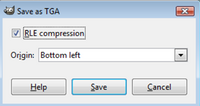
You're saving your skins with RLE compression. When you save skins, always go to "Save As" and then uncheck "RLE Compression" if you're using GIMP. Although, you only need to do it once every time you start up GIMP, after that it stays unchecked until you close GIMP.
Re: Trouble with skins
Posted: Fri Jul 24, 2009 4:09 pm
by Labj
Where exactly do i find that RLE ?
Re: Trouble with skins
Posted: Fri Jul 24, 2009 4:17 pm
by AQT
Do you use GIMP? Fluffy's post was pretty clear.
Re: Trouble with skins
Posted: Fri Jul 24, 2009 4:23 pm
by Fierfek
AQT wrote:Do you use GIMP? Fluffy's post was pretty clear.
It might be difficult for him to find it (he has the spanish version of gimp).
Re: Trouble with skins
Posted: Fri Jul 24, 2009 4:25 pm
by Labj
Yeah, i do, i have Gimp in spanish, but i talk in spanish and english, so where exactly it is ?
Re: Trouble with skins
Posted: Fri Jul 24, 2009 5:10 pm
by Fierfek
Labj wrote:Yeah, i do, i have Gimp in spanish, but i talk in spanish and english, so where exactly it is ?
When you save it, from the file menu, click "Save As".
When you save it as a TGA, this screen comes up:
Uncheck RLE Compression.
Re: Trouble with skins
Posted: Fri Jul 24, 2009 5:12 pm
by Labj
It works, in ZE, i will munge.
Yes, it works perfect.
Thaks everyone.