Kingpin wrote:I first want to say that I am not modeling in XSI; I use it to import, add render types to textures, and export.
Fair enough, but you're most likely going to need to use XSI to bake your lighting. I'm not sure if Blender or other programs are able to export to a format that XSI can import that keeps vertex color information. (FBX
might, but I'm not sure if XSI Mod Tool 7.5 includes the FBX plugin)
Kingpin wrote:Will tessellating my models require a second model, or is this something I do with my pre-existing model in XSI?
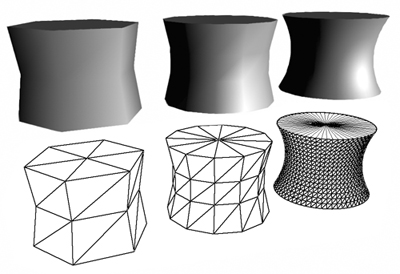
No. It's not so much that you're "tessellating your models" but rather you're making sure that they're tessellated enough for baking lighting into the vertices. As minilogoguy18 would put it, you're "adding unneeded vertex's",

except this is something that's *good* to do in this case. Basically, think of increasing tessellation as increasing the density of vertices and edges in order to make your polygon distribution more even.
Example of even polygon distribution:
Example of uneven polygon distribution:
Additionally, here's another good example of increasing tessellation:
With that said, you obviously shouldn't go *overboard* with it, the general rule of thumb for SWBF2 being to stay under 5,000 triangles for each building mesh.
Oh, and by the way, several things I forgot to mention before:
- You're probably going to want to learn how to set up portals/sectors for your map, especially if you start running into issues with flickering props and whatnot. (You can visualize the portals/sectors in the debugger by typing
vis.debugdraw into the console. Useful for seeing how exactly the portal/sector system works.)
- Be sure that you don't create shadowvolumes for your building meshes. Having them cast shadows will have a huge impact on your frame rate, and there's no real need for them anyways. With that said, it's totally fine and normal if small props cast shadows.
- You can actually adjust the intensity (opacity, basically) of shadows with the following ENVFX file parameter:
https://pastebin.com/Z45Dci7K (For quick iteration, you can adjust the intensity and see what it looks like on-the-fly by typing
shadow.intensity value into the debugger console, obviously replacing "value" with a number. In fact, many ENVFX parameters have this capability, like HDR and Blur. Worth noting that these are only temporary adjustments and won't be saved with the map or anything obviously lol.)
- Disable your map's terrain unless you actually need it. Doing so will increase your map's performance. The option to do so is in the Terrain Properties window in ZE.
- When you set up the lights in XSI for baking, you should set them up the same way that they'll be set up in ZE. What I mean by this is every spot, point, and directional light in XSI should be rotated, positioned, and colored exactly how they will be in ZE. Just keep in mind the lighting limits of Zero Engine when you're setting up the lights in ZE. (see the first bullet point under the "Misc Topics" header in
bf2_lighting)
-
Here's the RenderMap preset that I use for baking vertex colors into Europa's meshes, though I'm not sure if it'll work for other versions of XSI (I'm using Softimage 2015). To use it, save it to
%userprofile%\Autodesk\Softimage_2015\Data\DSPresets\Properties, and then load the preset in a RenderMap's properties window like so:
-
Here's the GI-/FG-ready preset that I use for Europa's point lights, but again, I'm not sure if it'll work with other versions of XSI. To use it, save it to
%userprofile%\Autodesk\Softimage_2015\Data\DSPresets\3DObjects, and then load the preset the same way you loaded the RenderMap preset:
For more information on what the different RenderMap and light settings do in XSI:
http://docs.autodesk.com/SI/2015/ENU//i ... ty1002.htm
http://docs.autodesk.com/SI/2015/ENU//i ... ty8519.htm
(I should really just start my own "tips & tricks" thread, eh?

)
 You just have to work around it by adapting and iterating. Anyways, for example, this is how Europa's Reception looks in XSI:


