Page 1 of 2
Vista Map location problem [Solved]
Posted: Fri Sep 25, 2009 11:11 am
by daniel
hi everybody,
i've kind of a problem: when i create a new world with visual munge, then munge it , the map works fine in the game but the three-letter-file isn't in the addoin folder and it's not in the C:\Users\<username>\AppData\Local\VirtualStore\Program Files\LucasArts\Star Wars Battlefront II\GameData\Addon (because there is no AppData-folder in my Users/username - folder). like i said everything works fine but of course the file's missing. can anyone help? thx
Re: Vista Map location problem
Posted: Fri Sep 25, 2009 11:20 am
by Darth_Spiderpig
Wait a min.. It works(You can play it), but isn't in the addon folder


Never heard of that....checking my pc...HUH, at mine also

Strange...
Re: Vista Map location problem
Posted: Fri Sep 25, 2009 11:34 am
by daniel
you have the same problem? ( i'm tslking of a ''problem'' because it kind of disturbes me that i can't delete it or just have anything )
Re: Vista Map location problem
Posted: Fri Sep 25, 2009 11:37 am
by Darth_Spiderpig
Right, I can't delete my maps from my instant action list

LOL, never noticed before, since my PC is new, and I haven't used to delete one of my maps yet

Re: Vista Map location problem
Posted: Fri Sep 25, 2009 12:23 pm
by 501st_commander
Question - I'm using Vista and I munged my new map but it isn't showing up here:
\LucasArts\Star Wars Battlefront II\GameData\Addon
so where is it?
Answer - Your newly munged map might have been copied to this location:
C:\Users\<username>\AppData\Local\VirtualStore\Program Files\LucasArts\Star Wars Battlefront II\GameData\Addon
EDIT:
offtopic:
700 posts!
EDIT2:
oops, i didn't read the post correctly..
try searching for the map
Re: Vista Map location problem
Posted: Fri Sep 25, 2009 12:30 pm
by eliminator
are you sure there isn't an addon folder?
type in the window-bar
C:\Users\<username>\AppData\Local\VirtualStore\Program Files\LucasArts\Star Wars Battlefront II\GameData\
and when you were there add the line
addon
i find my things so too
Edit:
O now i know what you mean
look at:
C:\Program Files\LucasArts\Star Wars Battlefront II\GameData\addon
Re: Vista Map location problem
Posted: Fri Sep 25, 2009 1:06 pm
by daniel
nope...did everything you told me to ..nothing there ...i also searched for the ABC folder (which would be the folder, normally located in the addon folder)..i found 5 different folders , but they all had to do with and located in BF2_ModTool...bla bla....i opened them, checked them...but thez all were not the one i was looking for. Where could it be??? i mean it must be somewhere doesn't it?
Re: Vista Map location problem
Posted: Sat Sep 26, 2009 8:04 pm
by Recon Trooper
Did you get battlefront by installing it or getting the program file?
If you got the program file it dosent copy the appdata.
Also check resent files folder.
PS I have vista and I hate it

Re: Vista Map location problem
Posted: Sun Sep 27, 2009 9:33 am
by daniel
i bought a normal copy of battlefront 2 (dvd-version). also did what you just said...didn't find it... this can't be !!

Re: Vista Map location problem
Posted: Sun Sep 27, 2009 11:30 am
by 501st_commander
501st_commander wrote:
try searching for the map
using windows search
Re: Vista Map location problem
Posted: Sun Sep 27, 2009 12:27 pm
by daniel
that's what i did. and just to clear this: i do have to look for ABC don't i ?
Re: Vista Map location problem
Posted: Sun Sep 27, 2009 12:29 pm
by SG-17
Vista is a pain in the Diet Dr. Pepper when it comes to older games. If you don't mind the time you could always reinstall SWBFII to a destination in your Documents or your desktop. That will prevent the pesky retarded file allocation that happens when you install to the Program Files.
Re: Vista Map location problem
Posted: Sun Sep 27, 2009 12:44 pm
by 501st_commander
SG-17 wrote:Vista is a pain in the Diet Dr. Pepper when it comes to older games. If you don't mind the time you could always reinstall SWBFII to a destination in your Documents or your desktop. That will prevent the pesky retarded file allocation that happens when you install to the Program Files.
Vista is a pain, i installing 7 on my vista pc. But i dont recommend installing bf2 on your desktop, or Documents folder. The Program Files folder is the best.
daniel wrote:that's what i did. and just to clear this: i do have to look for ABC don't i ?
Whats the moving location of visualmunge? (options - set Battlefront2 directory)
Re: Vista Map location problem
Posted: Sun Sep 27, 2009 12:59 pm
by daniel
it is : C:\Program Files (x86)\LucasArts\Star Wars Battlefront II\GameData
Re: Vista Map location problem
Posted: Sun Sep 27, 2009 1:04 pm
by 501st_commander
Program Files (x86)?
Does that exist?
Re: Vista Map location problem
Posted: Sun Sep 27, 2009 2:28 pm
by daniel
well on my computer it does

.could it be perhaps that modttools only works as it should when i've installed battlefront 2 and modtools in the normal program files thing? thx fpr advise
Re: Vista Map location problem
Posted: Sun Sep 27, 2009 2:32 pm
by 501st_commander
the modtools go on the C:/ drive only, they dont work very well if they are in program files.
Is there a Program Files (x86) and Program Files? Or just Program Files (x86)?
Re: Vista Map location problem
Posted: Sun Sep 27, 2009 2:42 pm
by obiboba3po
Believe this has been answered before. I run vista and will answer with a screenshot. Press "Compatibility files" and then go under data to find your worlds. (nothing to do with bad install, im sure its munged and installed all correctly)
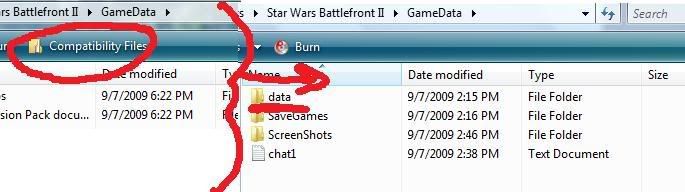
Note: This applies to anyone running
Windows Vista (regardless of version)
Re: Vista Map location problem
Posted: Sun Sep 27, 2009 3:36 pm
by daniel
@ 501st_commander: i have both folders, but the (x86) one was the one that was automaticly suggested.
@ obiboba : where do you mean do i have to press compatibly files ?
EDIT: forget it i found it . THanks obiboba, you're my saviour !!
(this thread can be closed)
Re: Vista Map location problem [Solved]
Posted: Sun Sep 27, 2009 4:17 pm
by [RDH]Zerted
Where did you find it? Was the AppData folder just hidden?