
Grrr... AI

In this forum you will find and post information regarding the modding of Star Wars Battlefront 2. DO NOT POST MOD IDEAS/REQUESTS.

Moderator: Moderators

Post Reply
Darth_Z13
Jedi High Council
Jedi High Council
Posts: 2275
Joined: Sat Jun 17, 2006 9:51 am
xbox live or psn: Xanthius Wylon
Location: Canada

Grrr... AI

Post by Darth_Z13 »

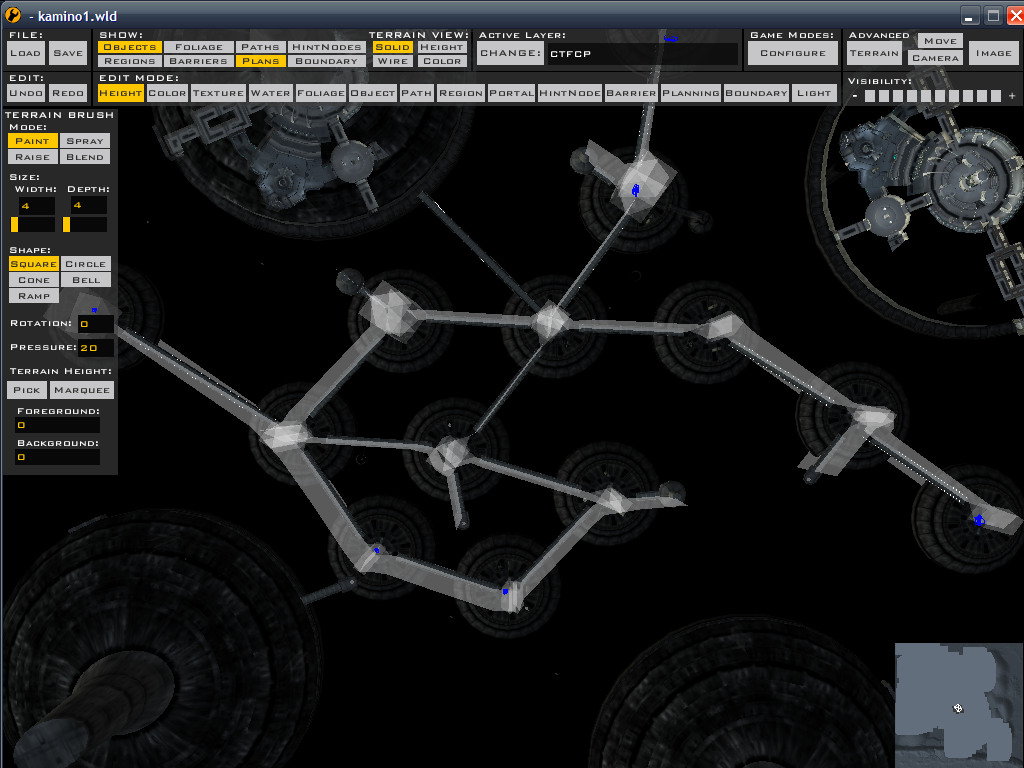
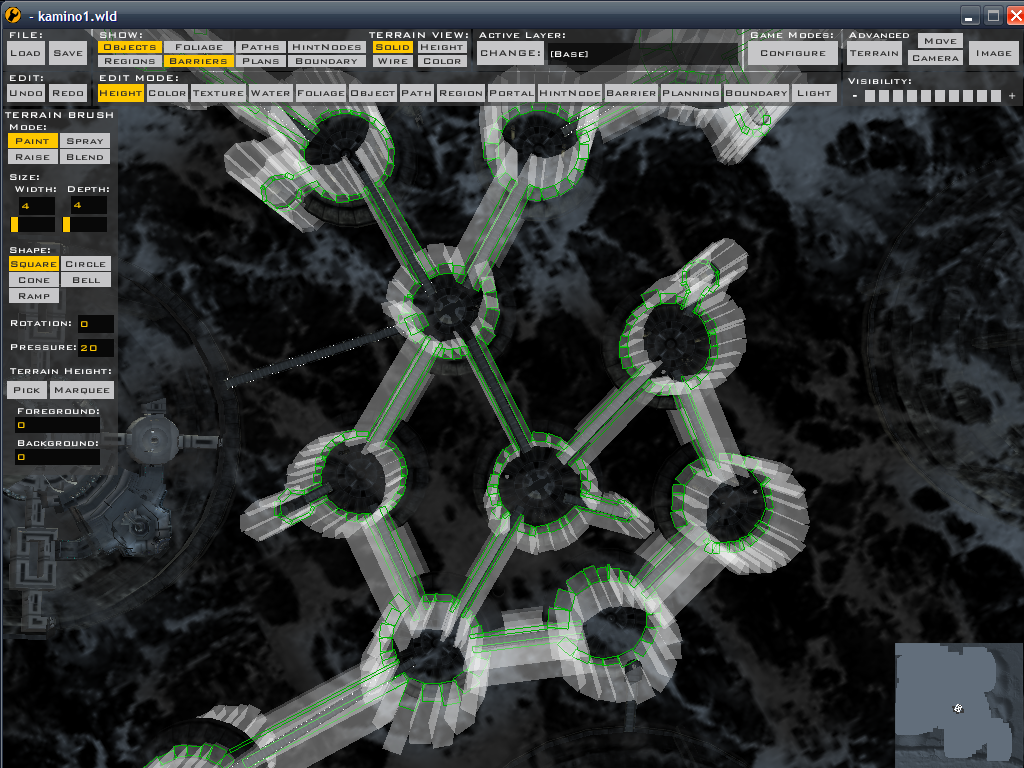
Well, I've been dealing with this problem for a while now. KCC's AI are the only thing keeping me from finishing the map. I've laid plans, I've setup barriers, I've redone planning and barriers.

The AI still run off edges, run into walls and basically refuse to follow what I've set.

My planning (blue dots are CPs):
Image

I've tried setting the hud radii to 1 and it doesn't work. So I've set it to 0. It's helped but not by much. :(

Am I doing something wrong? :|
User avatar
Maveritchell
Jedi Admin
Jedi Admin
Posts: 7366
Joined: Mon Aug 21, 2006 11:03 pm

Re: Grrr... AI

Post by Maveritchell »

I still am not clear on which direction they're running from the back CP. You said they were running off the platform; is it more in the direction of the green arrow or more in the direction of the red arrow?

Image
FragMe!
Gametoast Staff
Gametoast Staff
Posts: 2244
Joined: Sat May 13, 2006 12:34 am
Projects :: Not sure keep changing my mind.
Games I'm Playing :: F1 and SWBF
xbox live or psn: No gamertag set
Location: Origin name GT_FragMe
Contact:

Re: Grrr... AI

Post by FragMe! »

Grrr I made a post and it got lost in the web somewhere so if there ends up being two posts from me that's why.

Anyway can't really see the hubs but you may want to try putting in more hubs, like in the middle of the platform, then at the top of the ramp leading down, one in the middle of the ramp then on at the bottom. AI are a lot like little kids you have to tell them how to do things using really small words (short distances between hubs) in order to get them to do what you want.
That coupled with barriers should make them behave better.

speaking of that, how are the gazillion barriers coming along? :D
User avatar
Maveritchell
Jedi Admin
Jedi Admin
Posts: 7366
Joined: Mon Aug 21, 2006 11:03 pm

Re: Grrr... AI

Post by Maveritchell »

What FragMe said is sort've what I was leading towards. You need to put hubs close together; I was trying to figure out if the AI was maybe heading towards that hub in the center of the platform ring rather than heading for more logical hubs/CPs, simply because the illogical (and death-inducing) one is closer.

Put plainly, AI heads for the nearest hub/CP, sometimes to the exclusion of following paths.

I think the reason lowering the hubs' radii to 0 helped a little was because at 0 radius, a hub is basically nonexistant, and in those cases the AI just headed for the nearest CP.

So like FragMe said, more hubs.
Darth_Z13
Jedi High Council
Jedi High Council
Posts: 2275
Joined: Sat Jun 17, 2006 9:51 am
xbox live or psn: Xanthius Wylon
Location: Canada

Re: Grrr... AI

Post by Darth_Z13 »

In the red arrows direction. ;)

Hmm... I've got around 5 hubs for every platform, I'll just keep on trying. :(
Last edited by Darth_Z13 on Wed Sep 19, 2007 4:37 pm, edited 1 time in total.
FragMe!
Gametoast Staff
Gametoast Staff
Posts: 2244
Joined: Sat May 13, 2006 12:34 am
Projects :: Not sure keep changing my mind.
Games I'm Playing :: F1 and SWBF
xbox live or psn: No gamertag set
Location: Origin name GT_FragMe
Contact:

Re: Grrr... AI

Post by FragMe! »

Just quickly played the map again (the joys of being a beta) and it doesn't make sense like you say. I spawned at CP2 and the nearest is CP1 just a short run across the the joining bridge and the AI just turn around and run the other way (not even towards the ramp) There isn't a invisible CP that way is there?
Darth_Z13
Jedi High Council
Jedi High Council
Posts: 2275
Joined: Sat Jun 17, 2006 9:51 am
xbox live or psn: Xanthius Wylon
Location: Canada

Re: Grrr... AI

Post by Darth_Z13 »

FragMe! wrote:Just quickly played the map again (the joys of being a beta) and it doesn't make sense like you say. I spawned at CP2 and the nearest is CP1 just a short run across the the joining bridge and the AI just turn around and run the other way (not even towards the ramp) There isn't a invisible CP that way is there?
No, there's nothing over there except a big building and a rainshadow region. :?
FragMe!
Gametoast Staff
Gametoast Staff
Posts: 2244
Joined: Sat May 13, 2006 12:34 am
Projects :: Not sure keep changing my mind.
Games I'm Playing :: F1 and SWBF
xbox live or psn: No gamertag set
Location: Origin name GT_FragMe
Contact:

Re: Grrr... AI

Post by FragMe! »

I would just quickly throw a rough barrier around that side, from ramp to ramp, of 4 barrier segments or so and see how they react to that.

Another thing you may try is rotate the spawn nodes 180 degrees from where they are now. Not sure if you know how so I'll type it anyway :) Change active layer to conquest or whatever. The select paths, go to CP2 and select a node.

Press X and using the middle button rotate the 180 from where they are now. I noticed when the AI spawn they all face the fall off edge. This may or may not do anything but it's worth a try.
Darth_Z13
Jedi High Council
Jedi High Council
Posts: 2275
Joined: Sat Jun 17, 2006 9:51 am
xbox live or psn: Xanthius Wylon
Location: Canada

Re: Grrr... AI

Post by Darth_Z13 »

FragMe! wrote:I would just quickly throw a rough barrier around that side, from ramp to ramp, of 4 barrier segments or so and see how they react to that.

Another thing you may try is rotate the spawn nodes 180 degrees from where they are now. Not sure if you know how so I'll type it anyway :) Change active layer to conquest or whatever. The select paths, go to CP2 and select a node.
Press X and using the middle button rotate the 180 from where they are now. I noticed when the AI spawn they all face the fall off edge. This may or may not do anything but it's worth a try.
Image

I've already placed barriers around every platform and bridge on the map. They totally ignore them. :?
User avatar
Teancum
Jedi Admin
Jedi Admin
Posts: 11080
Joined: Wed Sep 07, 2005 11:42 pm
Projects :: No Mod project currently.
Games I'm Playing :: Destiny
xbox live or psn: No gamertag set
Location: Indiana

Re: Grrr... AI

Post by Teancum »

Make sure it's on the right layer. If it's not part of the layer you're using (or on the main layer) they'll ignore them.
Post Reply
