Page 1 of 1
Photoshop - Shine
Posted: Wed Mar 23, 2005 2:01 pm
by Lord-Bandu
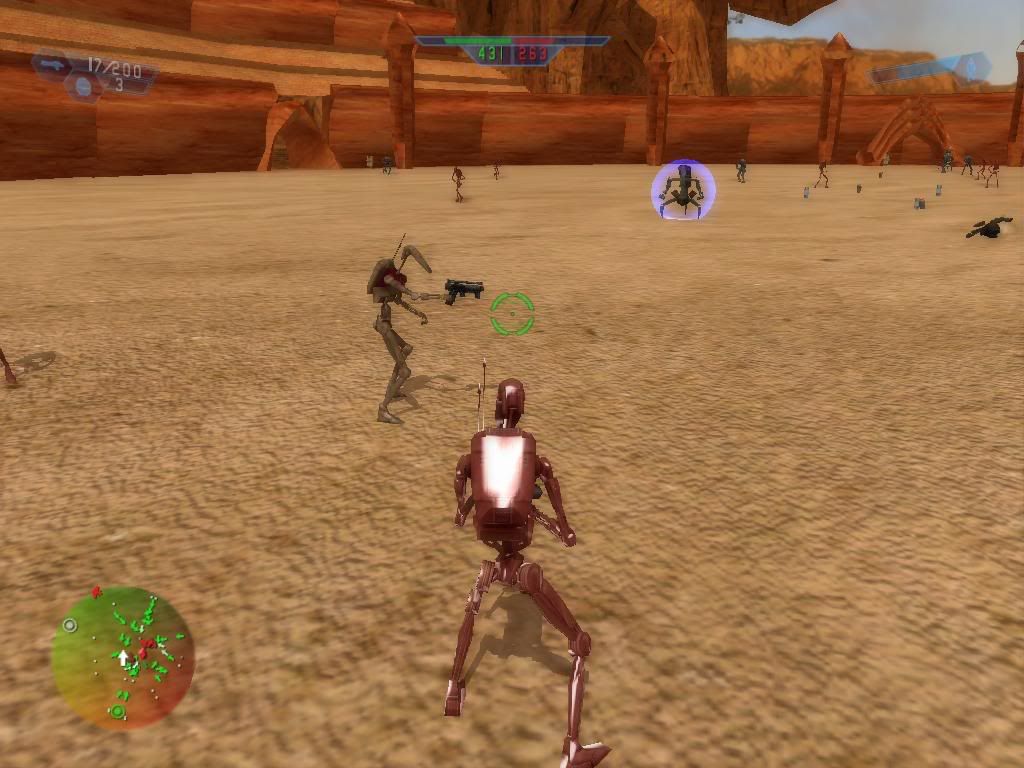
iv got the Battledroid to the colour im happy with but its gone all shiney which i do not want.
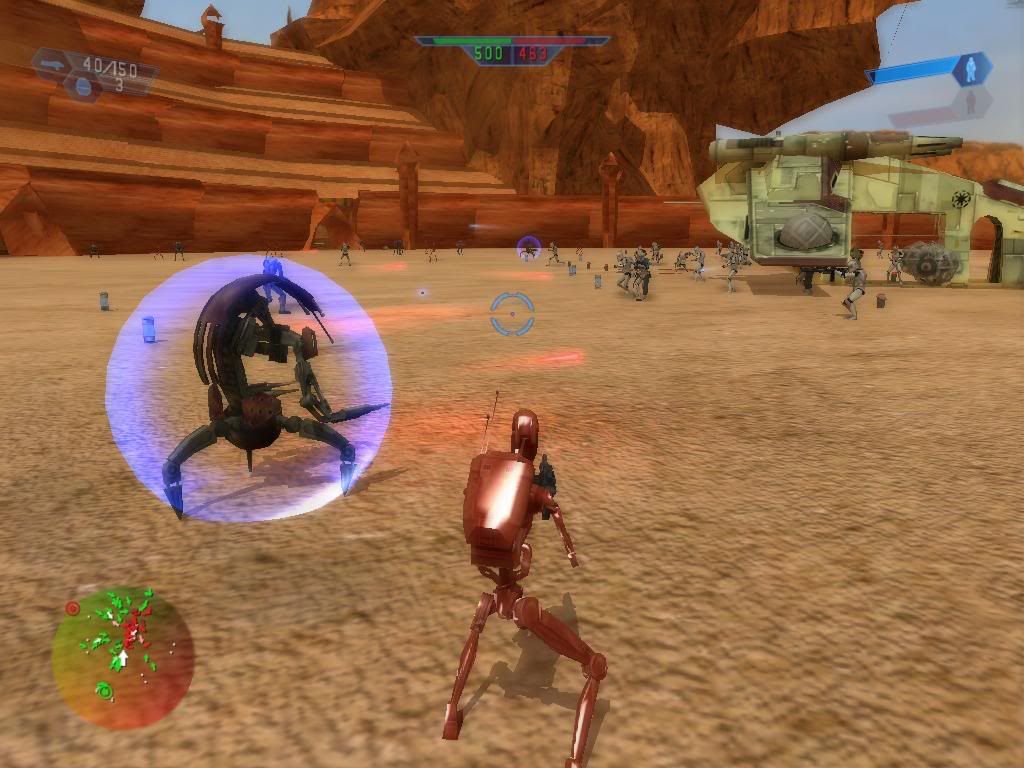
Iv also modded the Droidekas shield so its correct .
see pics....
The Droid is TOO shiney!
 http://img.photobucket.com/albums/v326/ ... dShine.jpg
The Shields are blue

(ignore the battledroid in this pic ....it is an early colour test)
http://img.photobucket.com/albums/v326/ ... shield.jpg
any1 know how to fix the shineyness???
ps. Im using the trial version of Adobe Photoshop Elements 3.0 . here is a pic of the settings im using when coloring
http://photobucket.com/albums/v326/aldr ... ent=23.jpg
Posted: Wed Mar 23, 2005 4:14 pm
by Saturn_V
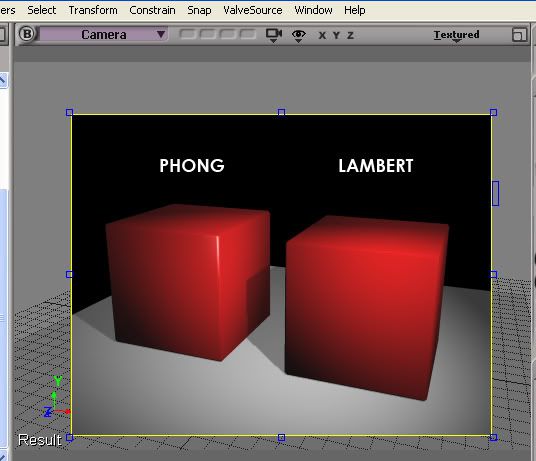
For those who don't know what it means, here's a picture.
The cubes have the same mesh, they have a slight bevel on the edges (to give the edge a little bit of "roundness" to show highlights)
The left one has been assigned a Phong shader, the right one a Lambert shader. Both have the same red color in the Diffuse slot, and are lit by a pure white spotlight.
Posted: Wed Mar 23, 2005 4:49 pm
by Lord-Bandu
i understand that ,but, iv not made the battledroid . Iv noticed a very slight shite (phong) to the other droids but nothin to the amount my photoshoped battledroid has.
Its only occured since i modded it in photoshop. So its a setting in photoshop that has made the shine(phong) stand out even more. Im a newbie when it comes to retexturing in photoshop so i may have used the wrong settings.
Posted: Wed Mar 23, 2005 5:06 pm
by Saturn_V
"slight shite"
Quite
Posted: Wed Mar 23, 2005 5:16 pm
by R2-D2
Can I have the map with the shiny driod?
Posted: Wed Mar 23, 2005 6:06 pm
by Saturn_V
Edit...
Posted: Wed Mar 23, 2005 6:34 pm
by Lord-Bandu
there is a glare on the shipped worlds droids but not as much as my photoshoped droid. i took the battledroids tga and just added a deep red on top of it . Its as if by adding this texture its emphasising the glare.
Posted: Thu Mar 24, 2005 3:36 am
by CCT*Ch@llenger
I don't know it is work but in your adobe test with the Auto Levels Option i test an i think it is good
Posted: Thu Mar 24, 2005 3:38 am
by ShadowHawk
Bandu, upload it to the Mandalorian Wars FTP and I'll see what's up for ya.
Posted: Thu Mar 24, 2005 11:49 pm
by Stellcat
Well i just want that droid

Posted: Fri Mar 25, 2005 12:28 am
by Lord-Bandu
could it be anything to do with the way i added the standard battledroid ? i put it in instead of the pilotdroid.
Posted: Thu Mar 31, 2005 7:29 pm
by ShadowHawk
Did a little research and came across (by accident) an explaination and possible fix. Everyone was right about it being in the model. The model has a transparency on the material. I saw the darktrooper had a shine to it also, so I imported the model in milkshape. It was there I saw that the skin had a transparency. To remove your shine problem, use bconstructor to import it into milkshape, remove the make the opacity 100%, then export it to msh. Problem with that though is not everything imports. (I have not verified it in game, only from what I saw in milkshape. Yes it is the full version before anyone asks anyone asks.) Has anyone else tried to import a character mesh and got the same problem? I don't see all the bones listed (just 2)and nonconnected vectors outlining the head. (has done this on all character models and some vehicles, ex. acclamator class transport for rep, so far.) Back to the subject, once this problem is solved, your problem should be solved.
Posted: Thu Mar 31, 2005 7:36 pm
by Saturn_V
Looking at the textures, 'hawk is bang on the money about the transparency. There is an alpha channel, which looks lke it controls the position / amount of shine; I would suggest trying to fix the problem via the texture rather than the model, though. Make sure you save the original alpha channel from the droid texture with your modified texture (as a 32 bit tga)
just to continue off topic, these "nonconnected vectors" sound like reversed normals on the polygons... got a screengrab of the problem ?
Posted: Thu Mar 31, 2005 11:39 pm
by ShadowHawk
Actually I do. Yellow is for bandu and red is for you.

Bandu: As you can see, here is the transparency. it is set in the model, but try Saturn_V's idea.
Saturn_V: As you can see, just dots for the head. I thought it was reversed also, but after rotating it, same results. HE IS HEADLESS!!

Also
1? section has a bunch of garbage linked to the main textured model. Solid too.

Saturn_V: This shows the bones in bconstructor and in Milkshape. Milkshape only shows 2 while bconstructor shows 21. Both, along with the hardpoints, are 0,0,0 and flat.
2? section I need a
detailed explaination on (like stell, I can be a dummy at times, plus it will help newbies) so I can be ready to port our Mandalorian Model to the game.
- In detail, what are these
- concerning HP_, where do they go, how do I use them, and how many can go on one model. (vehicles included)
- what needs to be added and where would I put those.
- where do the bones not listed in MS but are in BC go and what are they supposed to look like concerning the model?
(Think that somes up future questions on this area I hope.)
Hope the images help both of ya.
Posted: Fri Apr 01, 2005 12:45 am
by Nimlot
Only groups with actual geometry are exported from bcon. Basically there is no physical vertex data associated with each thing, and milkshape doesnt like those kinds of groups. I'm still playing around with skeleton data to get that stuff exported aswell.
Posted: Fri Apr 01, 2005 2:06 am
by ShadowHawk
Only groups with actual geometry are exported from bcon. Basically there is no physical vertex data associated with each thing, and milkshape doesnt like those kinds of groups. I'm still playing around with skeleton data to get that stuff exported aswell.
so basically, imported msh will not import fully into milksape as of yet.
Anyone with any tutorial or tips on importing a homemade model into BF? I tried to understand the info in the mod tool docs, but I had a hard time understanding both the model and animation parts. Can anyone translate it to plain english for me.