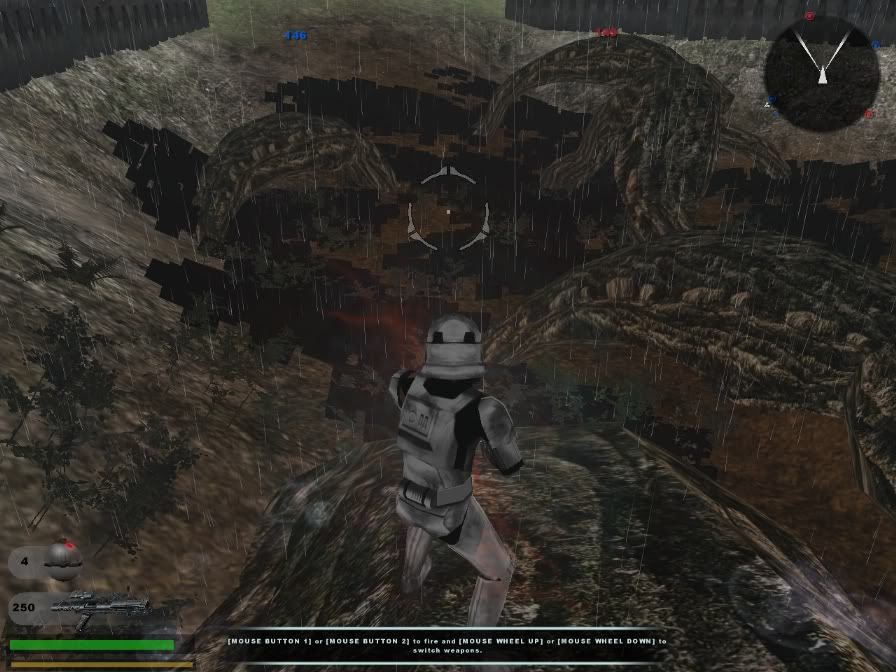
Here is my prp file if anyone needs it:
Black Foliage
Moderator: Moderators
- SW_elite
- Filthy Thief

- Posts: 507
- Joined: Sat Jan 02, 2010 6:43 pm
- Projects :: No Mod project currently.
- xbox live or psn: No gamertag set
- Location: Australia!!!
Black Foliage
Hidden/Spoiler:
Here is my prp file if anyone needs it:
Hidden/Spoiler:
- AgentSmith_#27
- Rebel Warrant Officer

- Posts: 302
- Joined: Thu Feb 11, 2010 3:10 pm
- Projects :: No Projects I am ready to unveil
- xbox live or psn: No gamertag set
- Location: Zeroeditor
- Contact:
Re: Black Foliage
That definitely looks like a missing texture to me, though I couldn't say which one.
-
RogueKnight
- Space Ranger
- Posts: 2512
- Joined: Sat Nov 22, 2008 1:50 pm
- Projects :: Life. Work.
- xbox live or psn: No gamertag set
- Location: Washington, US
Re: Black Foliage
find editor_grasspatch.msh, open it up in a word processer, and do a search for ".tga", this will show you what your missing texture is.
- Maveritchell
- Jedi Admin

- Posts: 7366
- Joined: Mon Aug 21, 2006 11:03 pm
Re: Black Foliage
The "editor_grasspatch" .msh file is a dummy mesh used with grasspatches (which are defined in an .odf file), and it does not show up in game (nor should it). Your missing texture is probably "nab_grass.tga," but you can find whatever texture should be referenced in the .odf file listed.RogueKnight wrote:find editor_grasspatch.msh, open it up in a word processer, and do a search for ".tga", this will show you what your missing texture is.
- SW_elite
- Filthy Thief

- Posts: 507
- Joined: Sat Jan 02, 2010 6:43 pm
- Projects :: No Mod project currently.
- xbox live or psn: No gamertag set
- Location: Australia!!!
Re: Black Foliage
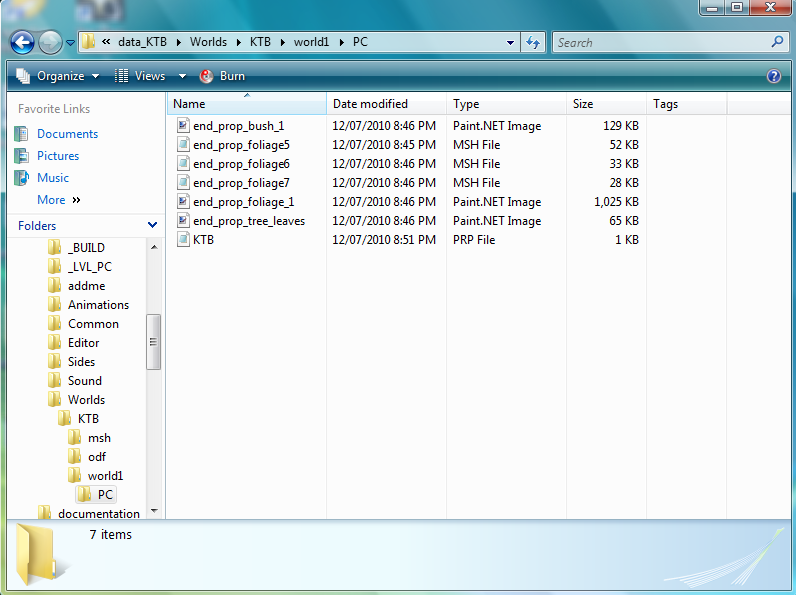
I've just found out that the foliage I was using in the picture in my first post, wasn't the foliage I actually thought it was. So, I've changed them to the ones you most comonly see in Endor, the big bushy ones. Now when I try loading my map with Zero Editor it returns an error saying that all three of my foliage msh files couldn't be found even though they are difinately in my worlds folder, along with my prp, and all the textures. I remembered to gather together all of my odf files that I needed as well. So since I can't figure out why this isn't working, here is a screenshot of my world1/PC folder and my prp file.
world1/PC folder Screenshot:
Prp file:
world1/PC folder Screenshot:
Hidden/Spoiler:
Hidden/Spoiler:
-
AQT
- Gametoast Staff

- Posts: 4910
- Joined: Sat Nov 03, 2007 4:55 pm
- Location: SoCal, USA
Re: Black Foliage
Do you have the ODFs that .prp file calls for in your odf folder? Make sure you have the TGAs those ODFs call for in your msh folder as well.
- SW_elite
- Filthy Thief

- Posts: 507
- Joined: Sat Jan 02, 2010 6:43 pm
- Projects :: No Mod project currently.
- xbox live or psn: No gamertag set
- Location: Australia!!!
Re: Black Foliage
I added the Grasspatch bit in all of them... So I do have the odf's, I made sure, but I'll go check the tga's now...
EDIT: That's strange, the odf's dont say which tga it wants, just what msh it needs.
EDIT: Don't the msh files have to be in my worlds msh folder?
EDIT: That's strange, the odf's dont say which tga it wants, just what msh it needs.
EDIT: Don't the msh files have to be in my worlds msh folder?
-
AQT
- Gametoast Staff

- Posts: 4910
- Joined: Sat Nov 03, 2007 4:55 pm
- Location: SoCal, USA
Re: Black Foliage
MSH files can go in your msh folder or your world1 folder depending on what it is.
By the way, you're setting up your .prp file in a redundant way. Why don't you take a look at the stock Endor .prp file for reference? You only need to set up an ODF if you are using the editor_grasspatch.msh file.
Another name for TGA is texture.EDIT: That's strange, the odf's dont say which tga it wants, just what msh it needs.
By the way, you're setting up your .prp file in a redundant way. Why don't you take a look at the stock Endor .prp file for reference? You only need to set up an ODF if you are using the editor_grasspatch.msh file.
- SW_elite
- Filthy Thief

- Posts: 507
- Joined: Sat Jan 02, 2010 6:43 pm
- Projects :: No Mod project currently.
- xbox live or psn: No gamertag set
- Location: Australia!!!
Re: Black Foliage
I had a look before I started the swap but it confused me somehow. Just so you get a better idea, this is what my odf file looks like... And it's the same for all three of them.
AHHHHHHHHHH!!! I just went into my map in zero editor and it's crashing as soon as I start loading!!! I CANT LOSE THIS MAP!!!
Hidden/Spoiler:
-
FragMe!
- Gametoast Staff

- Posts: 2244
- Joined: Sat May 13, 2006 12:34 am
- Projects :: Not sure keep changing my mind.
- xbox live or psn: No gamertag set
- Location: Origin name GT_FragMe
- Contact:
Re: Black Foliage
Try renaming or moving the prp file and try opening the map again.
If that allows you to open your map then start again with the foliage with a fresh prp file.
- lucasfart
- Sith

- Posts: 1440
- Joined: Tue Feb 24, 2009 5:32 am
- Projects :: No Mod project currently.
- xbox live or psn: No gamertag set
- Location: Australia
Re: Black Foliage
You can tell what texture the msh needs by opening up your msh in bfviewer and going to the debug log. It tells you all the textures used in the relevant msh. That might help you find out which one you're missing....
- SW_elite
- Filthy Thief

- Posts: 507
- Joined: Sat Jan 02, 2010 6:43 pm
- Projects :: No Mod project currently.
- xbox live or psn: No gamertag set
- Location: Australia!!!
Re: Black Foliage
Okay, I gave what you said a try FragMe! but with no luck. Do you have any other ideas for fixing this error? I really really cannot lose this map...
@Lucas - Thanks for saying but I allready knew, even though I dont even use it... I just take a peek into the msh files.
-
FragMe!
- Gametoast Staff

- Posts: 2244
- Joined: Sat May 13, 2006 12:34 am
- Projects :: Not sure keep changing my mind.
- xbox live or psn: No gamertag set
- Location: Origin name GT_FragMe
- Contact:
Re: Black Foliage
Is there a lot of terrain work?
What you could do is move your current map folder to some place save, create a new world with the same 3 letter name etc then copy back everything but the .wld and .prp file to start.
See if that at least that gets the object placement part back.

What you could do is move your current map folder to some place save, create a new world with the same 3 letter name etc then copy back everything but the .wld and .prp file to start.
See if that at least that gets the object placement part back.
- SW_elite
- Filthy Thief

- Posts: 507
- Joined: Sat Jan 02, 2010 6:43 pm
- Projects :: No Mod project currently.
- xbox live or psn: No gamertag set
- Location: Australia!!!
Re: Black Foliage
Ohhh, this is what I thought I'd have to do but really didnt want to. I'll wait to see how my other thread develops and then make my decision.
EDIT: Tean is doing a favor for me that could get my map working again, so atm, all progress has come to a halt.