Floating Icon (with Icon in HUD) [Solved]
Posted: Thu Mar 03, 2011 5:27 pm
by Havoc 526
Okay, I think the title explains it all, but I think this picture would make it more clear.
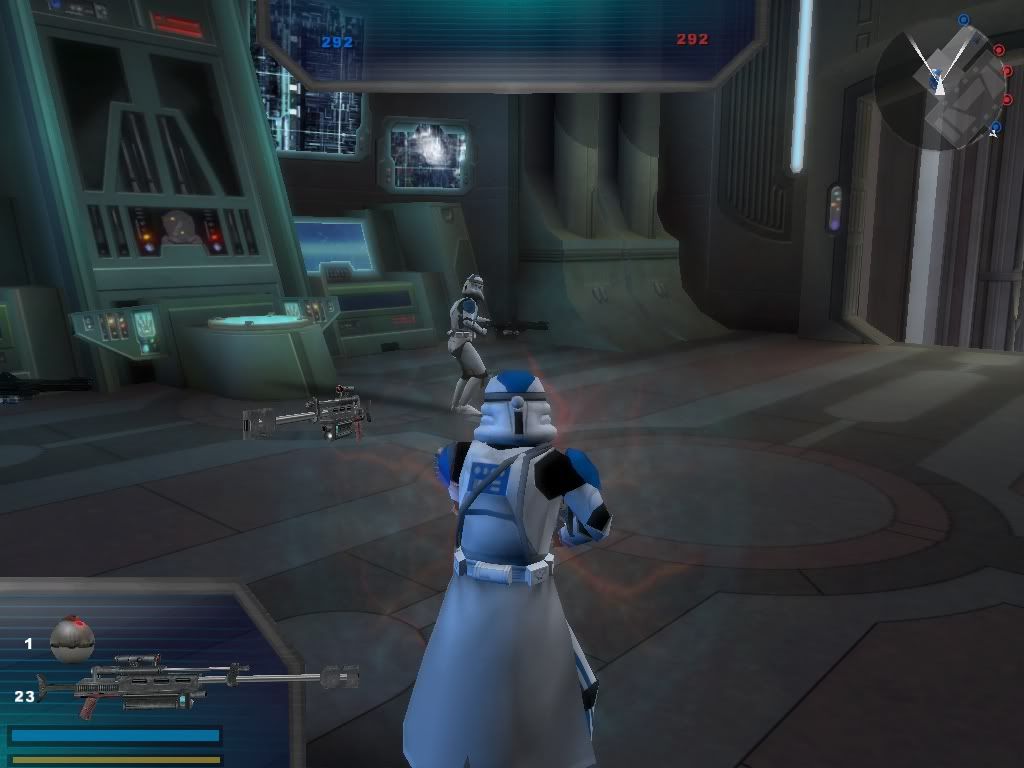
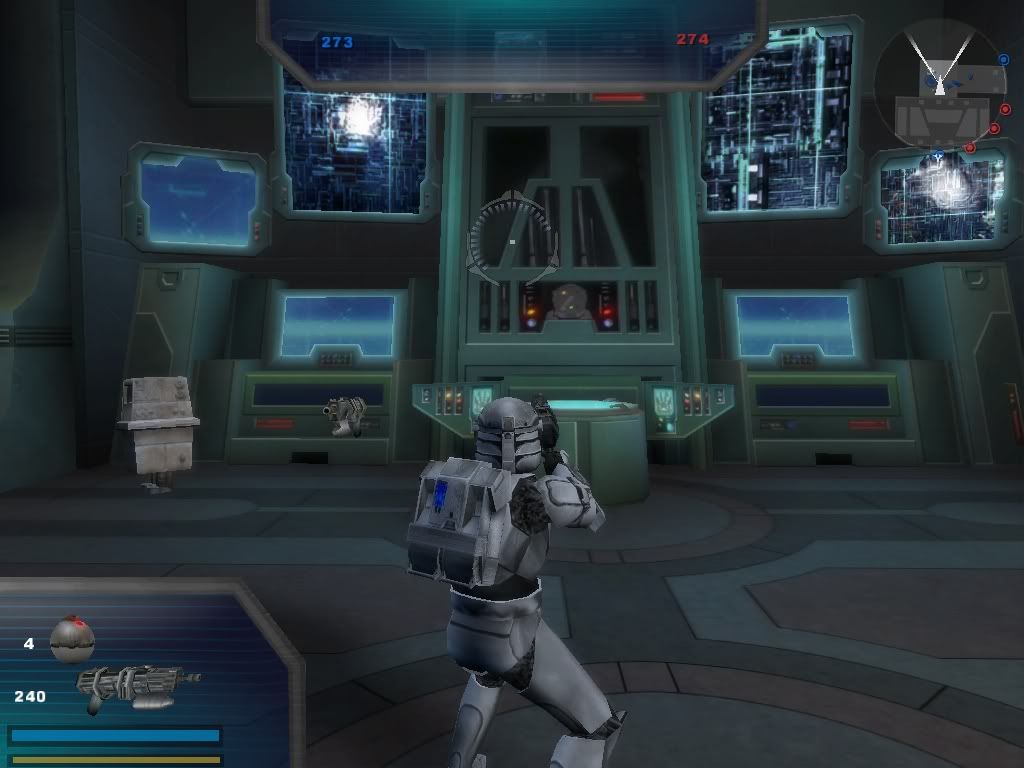 Here's my hud file (All credit for the models goes to their respective makers.)
I've been looking for a way to fix this for a while now, but I can't find anything! This wouldn't have anything to do with "invisible_mesh", now would it?
Here's my hud file (All credit for the models goes to their respective makers.)
I've been looking for a way to fix this for a while now, but I can't find anything! This wouldn't have anything to do with "invisible_mesh", now would it?
Hidden/Spoiler:
Hidden/Spoiler:
ViewPort("Transforms")
{
EventNameFilter("player%")
TransformNameMesh("player1weapon1")
{
// Take a weapon-change, give back a different mesh name to be displayed.
EventInput("player1.weapon1.change")
EventOutput("player1.weapon1.mesh")
// Make these meshes appear as another mesh in the BF2 HUD spot
// from the file 1playerhud.hud.
// The point is to replace "hud_droideka_shield" with a mesh that you create
// which exists but is invisible. The mesh MUST exist!
// If you do that, then that gets rid of the midscreen floating weapon display
// for our new weapons.
NameMesh("rep_weap_dc15st", "invisible_mesh")
NameMesh("rep_hyper_sniper", "invisible_mesh")
NameMesh("rep_weap_dc17sniper", "invisible_mesh")
NameMesh("rep_weap_dc17blast", "invisible_mesh")
NameMesh("rep_weap_dc15carbine", "invisible_mesh")
NameMesh("rep_weap_inf_pistol_mini_r", "invisible_mesh")
}
}
Group("extraWeaponDisplay")
{
PropagateAlpha(1)
Viewport(1)
Position(0.000000, 1.00000, 0.000000, "Viewport")
ZOrder(255)
EventEnable("player1.weaponsEnable")
EventDisable("player1.weaponsDisable")
Group("extraWeaponIcon")
{
Viewport(1)
Position(0.346161, -0.450412, 0.000000, "Viewport")
EventEnable("initialize")
Model3D("player1weapon1mesh")
{
// Instead of using player1.weapon1.mesh, which was replaced in the
// NameMesh() with hud_droideka_shield, we're using the actual
// mesh of the weapon that the player switched to, which is
// still rep_weap_inf_rifle or arcrifle or whatnot.
EventMesh("player1.weapon1.change")
Viewport(1)
ZOrder(5)
EventEnable("player1.weapon1.mesh")
EventDisable("player1.weapon1.disable")
// This model should be offscreen and invisible if the weapon
// is not defined below - this is to avoid showing duplicates of
// weapons that already are defined in the BF2 1playerhud.hud file.
// To accomplish that, scale to 0 and place offscreen.
Scale(0, 0, 0)
Position(500, 500, 500, "viewport")
// Now, for our new weapons only, reposition this icon and display it.
MeshInfo("rep_weap_dc15st")
{
Viewport(1)
Position(-0.219723, 0.364485, 0.003263, "Viewport")
Rotation(1.538445, 95.690582, 4.455857)
Scale(0.800000, 0.800000, 0.800000)
}
MeshInfo("rep_hyper_sniper")
{
Viewport(1)
Position(-0.249442, 0.359076, 0.007261, "Viewport")
Rotation(0.804269, 90.747269, 359.999695)
Scale(1.140000, 1.140000, 1.140000)
}
MeshInfo("rep_weap_dc17sniper")
{
Viewport(1)
Position(-0.219723, 0.364485, 0.003263, "Viewport")
Rotation(1.538445, 95.690582, 4.455857)
Scale(1.140000, 1.140000, 1.140000)
}
MeshInfo("rep_weap_dc17blast")
{
Viewport(1)
Position(-0.249442, 0.359076, 0.007261, "Viewport")
Rotation(0.804269, 90.747269, 359.999695)
Scale(1.140000, 1.140000, 1.140000)
}
MeshInfo("rep_weap_dc15carbine")
{
Viewport(1)
Position(-0.249442, 0.359076, 0.007261, "Viewport")
Rotation(0.804269, 90.747269, 359.999695)
Scale(1.140000, 1.140000, 1.140000)
}
MeshInfo("rep_weap_inf_pistol_mini_r")
{
Viewport(1)
Position(-0.219723, 0.364485, 0.003263, "Viewport")
Rotation(1.538445, 95.690582, 4.455857)
Scale(0.800000, 0.800000, 0.800000)
}
}
}
}
{
EventNameFilter("player%")
TransformNameMesh("player1weapon1")
{
// Take a weapon-change, give back a different mesh name to be displayed.
EventInput("player1.weapon1.change")
EventOutput("player1.weapon1.mesh")
// Make these meshes appear as another mesh in the BF2 HUD spot
// from the file 1playerhud.hud.
// The point is to replace "hud_droideka_shield" with a mesh that you create
// which exists but is invisible. The mesh MUST exist!
// If you do that, then that gets rid of the midscreen floating weapon display
// for our new weapons.
NameMesh("rep_weap_dc15st", "invisible_mesh")
NameMesh("rep_hyper_sniper", "invisible_mesh")
NameMesh("rep_weap_dc17sniper", "invisible_mesh")
NameMesh("rep_weap_dc17blast", "invisible_mesh")
NameMesh("rep_weap_dc15carbine", "invisible_mesh")
NameMesh("rep_weap_inf_pistol_mini_r", "invisible_mesh")
}
}
Group("extraWeaponDisplay")
{
PropagateAlpha(1)
Viewport(1)
Position(0.000000, 1.00000, 0.000000, "Viewport")
ZOrder(255)
EventEnable("player1.weaponsEnable")
EventDisable("player1.weaponsDisable")
Group("extraWeaponIcon")
{
Viewport(1)
Position(0.346161, -0.450412, 0.000000, "Viewport")
EventEnable("initialize")
Model3D("player1weapon1mesh")
{
// Instead of using player1.weapon1.mesh, which was replaced in the
// NameMesh() with hud_droideka_shield, we're using the actual
// mesh of the weapon that the player switched to, which is
// still rep_weap_inf_rifle or arcrifle or whatnot.
EventMesh("player1.weapon1.change")
Viewport(1)
ZOrder(5)
EventEnable("player1.weapon1.mesh")
EventDisable("player1.weapon1.disable")
// This model should be offscreen and invisible if the weapon
// is not defined below - this is to avoid showing duplicates of
// weapons that already are defined in the BF2 1playerhud.hud file.
// To accomplish that, scale to 0 and place offscreen.
Scale(0, 0, 0)
Position(500, 500, 500, "viewport")
// Now, for our new weapons only, reposition this icon and display it.
MeshInfo("rep_weap_dc15st")
{
Viewport(1)
Position(-0.219723, 0.364485, 0.003263, "Viewport")
Rotation(1.538445, 95.690582, 4.455857)
Scale(0.800000, 0.800000, 0.800000)
}
MeshInfo("rep_hyper_sniper")
{
Viewport(1)
Position(-0.249442, 0.359076, 0.007261, "Viewport")
Rotation(0.804269, 90.747269, 359.999695)
Scale(1.140000, 1.140000, 1.140000)
}
MeshInfo("rep_weap_dc17sniper")
{
Viewport(1)
Position(-0.219723, 0.364485, 0.003263, "Viewport")
Rotation(1.538445, 95.690582, 4.455857)
Scale(1.140000, 1.140000, 1.140000)
}
MeshInfo("rep_weap_dc17blast")
{
Viewport(1)
Position(-0.249442, 0.359076, 0.007261, "Viewport")
Rotation(0.804269, 90.747269, 359.999695)
Scale(1.140000, 1.140000, 1.140000)
}
MeshInfo("rep_weap_dc15carbine")
{
Viewport(1)
Position(-0.249442, 0.359076, 0.007261, "Viewport")
Rotation(0.804269, 90.747269, 359.999695)
Scale(1.140000, 1.140000, 1.140000)
}
MeshInfo("rep_weap_inf_pistol_mini_r")
{
Viewport(1)
Position(-0.219723, 0.364485, 0.003263, "Viewport")
Rotation(1.538445, 95.690582, 4.455857)
Scale(0.800000, 0.800000, 0.800000)
}
}
}
}