Trouble getting door animations working [Solved]
Posted: Sat Jan 23, 2016 10:06 am
So I've never been able to successfully get custom doors working. I believe it's always been an issue with my exported animations.
I'm able to export meshes and character animations perfectly fine, but when it comes to doors, they never seem to work for me, and I haven't the slightest idea why. My only guess is it's something to do with the animations themselves.
I highly doubt it's an issue with my animation munge .bat files because I'm able to export character animations perfectly fine, I don't get any errors in the ZenAsset log or munge log, and the munged files appear where they should.
This time, I followed FragMe!'s simple door animation tutorial (found here: http://www.gametoast.com/viewtopic.php?f=36&t=14540 ). The game freezes and soon crashes while the map is loading (near the end of the load cycle). This only happens when the door object is placed in the map.
When I exported, I:
- checked "Export Animations" in the ZE Tools .msh exporter when exporting the open animation
- checked "Export Animations" and "Current frame as Basepose" in the exporter when exporting the basepose
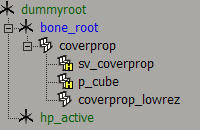
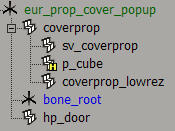
- selected the following object pre-exporting:
ODF file:
MSH file:
https://www.dropbox.com/s/5zxoc2hvdxmi8 ... p.msh?dl=0
Animation bank folder:
https://www.dropbox.com/s/1igvndt8yy344 ... up.7z?dl=0
Any help whatsoever is very highly appreciated. Let me know if you have any questions or require further information.
Thanks!
I'm able to export meshes and character animations perfectly fine, but when it comes to doors, they never seem to work for me, and I haven't the slightest idea why. My only guess is it's something to do with the animations themselves.
I highly doubt it's an issue with my animation munge .bat files because I'm able to export character animations perfectly fine, I don't get any errors in the ZenAsset log or munge log, and the munged files appear where they should.
This time, I followed FragMe!'s simple door animation tutorial (found here: http://www.gametoast.com/viewtopic.php?f=36&t=14540 ). The game freezes and soon crashes while the map is loading (near the end of the load cycle). This only happens when the door object is placed in the map.
When I exported, I:
- checked "Export Animations" in the ZE Tools .msh exporter when exporting the open animation
- checked "Export Animations" and "Current frame as Basepose" in the exporter when exporting the basepose
- selected the following object pre-exporting:
Hidden/Spoiler:
Code: Select all
[GameObjectClass]
ClassLabel  = "door"
GeometryName    = "editor_eur_prop_cover_popup.msh"

[Properties]
GeometryName    = "eur_prop_cover_popup"
AnimationName     = "eur_cover_popup"

Animation         = "open"
AnimationTrigger  = "hp_door 4.0"

OrdnanceCollision = "p_cube"

FoleyFXGroup = "metal_foley"https://www.dropbox.com/s/5zxoc2hvdxmi8 ... p.msh?dl=0
Animation bank folder:
https://www.dropbox.com/s/1igvndt8yy344 ... up.7z?dl=0
Any help whatsoever is very highly appreciated. Let me know if you have any questions or require further information.
Thanks!