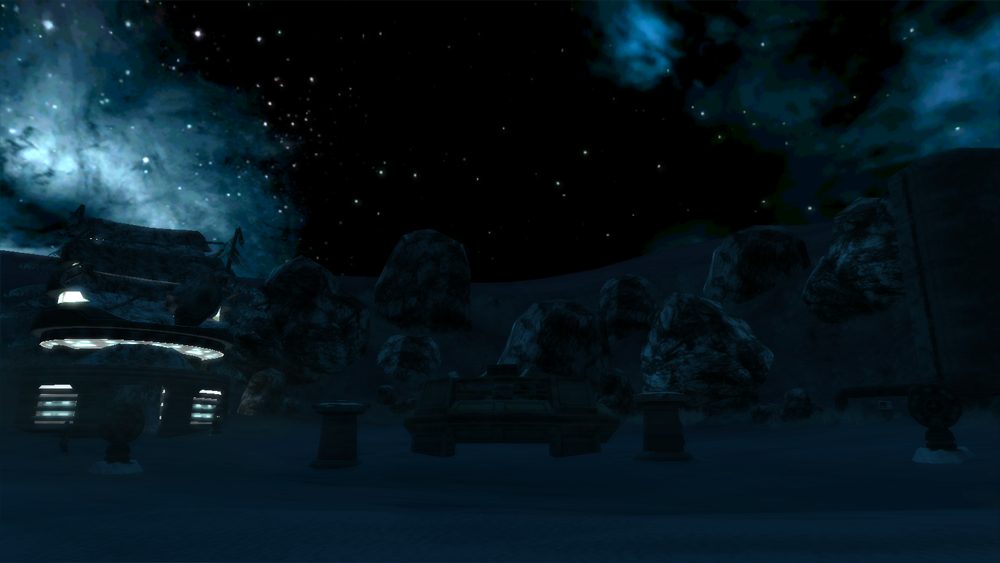
How do I line up the sun effect with lighting in ZE?
Posted: Wed Jan 30, 2013 10:57 pm
by Loopy53
The title says it all. Is there an easy way to determine where to put your global directional light in ZE so that it matches the sun effect ingame. currently im placing my light via trial and error. just wondering if there is an easy way. Thanks!
Re: lining up sun effect with lighting in ZE
Posted: Thu Jan 31, 2013 12:58 am
by AceMastermind
If you're looking for a one-click solution then I don't think you'll find one, trial and error will get you there eventually and you'll learn more along the way. I outlined my test results for the sun effect here some time ago. The light information saved from ZE is stored as quaternion rotations with xyz positioning, whereas the effect uses 2 angles(altitude and azimuth) to determine the location.
Re: lining up sun effect with lighting in ZE
Posted: Thu Jan 31, 2013 3:59 am
by Marth8880
From the Prothean Skyway's ENVFX file. The comment for Angle is the result when both Angle values are set to 0.
SunFlare()
{
	Angle(115.000000, -30.000000); // altitude, azimuth; starts at a heading of 90, at the bottom of the skydome
	Color(255, 255, 200);
	Size(0.75);
	FlareOutSize(0.75);
	NumFlareOuts(6);
	InitialFlareOutAlpha(128);
	HaloInnerRing(0.0, 255, 255, 255, 255);
	HaloMiddleRing(1.0, 204, 145, 204, 203);
	HaloOutterRing(30.0, 52, 43, 74, 0);
	SpikeColor(20,252,255,128);
	SpikeSize(1.5);
}
Re: lining up sun effect with lighting in ZE
Posted: Fri Feb 01, 2013 2:29 pm
by Fiodis
I toyed for a couple weeks a while back with a GUI for positioning the sun and skydome objects. I didn't consider correlating it with ZE lighting information, though. Where are these quaternion rotations stored?
Re: lining up sun effect with lighting in ZE
Posted: Fri Feb 01, 2013 7:11 pm
by AceMastermind
Lighting info is saved to your ABC.LGT file in the world1 folder.
Re: lining up sun effect with lighting in ZE
Posted: Sun Feb 03, 2013 12:04 am
by Loopy53
I have another question about lighting. Which value do I edit to achieve a dark blue apocalyptic-type light, and what number would I put? Like the top/bottom ambient color, or the color value on the left? I'll fiddle with it and see what works best. I dont want the units to be colored oddly, which is what I achieved with no sky color change.
Re: lining up sun effect with lighting in ZE
Posted: Sun Feb 03, 2013 12:30 am
by GAB
Loopy53 wrote:Which value do I edit to achieve a dark blue apocalyptic-type light, and what number would I put? Like the top/bottom ambient color, or the color value on the left?
I'd suggest editing both the top and bottom ambient colors. And add a directional light for some complementary lighting. And about values, try 5 22 33 for the Top Ambient Color and 3 21 29 for the Bottom Ambient Color. I used values very close to these for the Alzoc 3 night setting and got some pretty nice results. (Zero Engine's lighting seems to work quite nicely for dark environments)
Re: lining up sun effect with lighting in ZE
Posted: Sun Feb 03, 2013 12:39 pm
by Loopy53
many thanks gab!
EDIT: With those values, I get it darker, but not jet black. This is what im going for:
Hidden/Spoiler:
What does the normal color value due? Also, does having the sun effect affect anything? Does the rotation of the light in ze affect anything? I darkened the terrain and sky textures to little effect. Thanks for the help Gab!
Re: lining up sun effect with lighting in ZE
Posted: Sun Feb 03, 2013 6:58 pm
by Marth8880
Loopy53 wrote:What does the normal color value due?
What? The normal color value? What do you mean?
Loopy53 wrote:Also, does having the sun effect affect anything?
No, the sun flare effect in the ENVFX file does not affect the lighting in any way, other than some HDR stuff if you have that effect enabled as well.
Loopy53 wrote:Does the rotation of the light in ze affect anything?
Yes. It affects the direction that the light points. :p
Re: lining up sun effect with lighting in ZE
Posted: Sun Feb 03, 2013 11:47 pm
by Loopy53
The color value on the left. Heres a pic.
Hidden/Spoiler:
What I meant with light rotation is does the rotation of the directional light affect the brightness.
Re: lining up sun effect with lighting in ZE
Posted: Mon Feb 04, 2013 12:02 am
by Marth8880
Those affect the color of the light you have selected.
Re: lining up sun effect with lighting in ZE
Posted: Mon Feb 04, 2013 8:44 am
by GAB
To achieve the results in the picture, try 6 23 24 for you "sun" light.
Re: lining up sun effect with lighting in ZE
Posted: Mon Feb 04, 2013 8:07 pm
by Loopy53
IN ZE it looks like I want ingame, but ingame its still to bright. I will post screenshots of 1) my ZE values and 2) ingame within the next couple hours or so.
EDIT:
Hidden/Spoiler:
The bottom screenshot is still too bright. However it looks exactly what I want in ZE. Am I doing something wrong? Would I have to edit the ground textures? As you can see, the units are dark and the rest isn't. I want everything to have dark lighting on it, or the "lighting in the air" should be dark. Thanks for all the help everyone!!
Hidden/Spoiler:
yes, there are no objects. Once I get lighting and sky down pat I plan on modelling custom desert buildings(some with interiors maybe), tanks(4 hits to kill another tank, 2-3 to kill a jeep/hummer, 1 for infantry, slow rate of fire), hummer/jeeps/technical (2 of the 3, with machine guns on top/back, 3-5 hits to kill a player, medium-slow rate of fire), helicopters (drastically editted snow speeder I think) and weapon models. I may even go all out and model a custom player model or two. but yeah, im going big here. I will post a WIP thread once I finish mapping. ETA 1 - 2 months. Then comes all the side work.
Re: lining up sun effect with lighting in ZE
Posted: Mon Feb 04, 2013 8:59 pm
by Marth8880
You must burn the witc-- err, terrain in order for lighting changes to affect it.
Re: lining up sun effect with lighting in ZE
Posted: Mon Feb 04, 2013 9:04 pm
by GAB
Or you can also paint it in ZE. Personally, I think painting the terrain to match the lighting instead of burning it allows you to have a lot better control of its coloring and gives better results, in my opinion. None of the terrains in my Alzoc map were ever burned. All of them were painted to match the lighting.
Re: lining up sun effect with lighting in ZE
Posted: Mon Feb 04, 2013 9:07 pm
by Loopy53
I'll try burning for now. How do you paint the terrain? Its too dark now after I burned it XD so I will fiddle with the values.
Re: lining up sun effect with lighting in ZE
Posted: Mon Feb 04, 2013 9:11 pm
by GAB
That's one reason I prefer painting over burning. Usually, it gets too dark. And, to paint the terrain you can use ZE's color tab.
EDIT: If you want, I can give you color values for you to use on the terrain.
Re: lining up sun effect with lighting in ZE
Posted: Mon Feb 04, 2013 9:19 pm
by Loopy53
That'd be great gab! Thanks a ton!
Re: lining up sun effect with lighting in ZE
Posted: Mon Feb 04, 2013 9:27 pm
by GAB
Ok. Try painting using values around 41 74 92. They should match your lighting well.
Re: lining up sun effect with lighting in ZE
Posted: Fri Feb 15, 2013 9:49 pm
by Loopy53
Sorry for the belated response. Thanks gab, my map is now lit perfectly. Solved.
EDIT: It's to dark, I will try doubling the values to get a lighter color.
EDIT2: Now im for real solved XD doubling it worked PERFECTLY. Thank you so much all.
 (Zero Engine's lighting seems to work quite nicely for dark environments)